Conditions
This section explains the conditions related to the boundaries and the volume in a Circumferential Valve simulation.
The boundary conditions for a desired boundary can be specified through:
Geometric Entities Panel > Boundaries > [Desired boundary]
Properties Panel > Model Tab >Circumferential Valve > [Desired options]
The circumferential valve template has following boundary conditions.
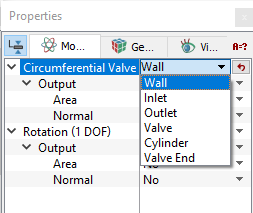
Figure 6.566 - Circumferential - Conditions
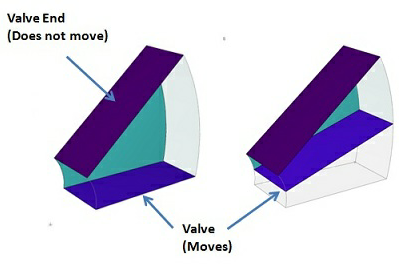
- Cylinder: This corresponds to the boundaries along which the valve slides during its motion. This boundary can be of cylindrical shape or planar surface as shown in the Figure 6.567. This boundary condition is automatically assigned during the Valve Template Mesher process.
-
Valve: This corresponds to all the moving surfaces.
-
Valve End: This corresponds to the end boundaries of a valve chamber.
Note: The Cylinder Surfaces, Valve and Valve End are the boundary conditions are set automatically while meshing under the valve template.
- Inlet: This specifies the inlet flow boundary. A Specified Pressure Inlet is the preferred and default boundary condition in the Flow module for a valve Inlet boundary.
Note: Inlet boundary cannot be a part of a valve chamber. If a boundary functions as both an inlet and a boundary of the valve chamber, it should be assigned the valve function and subsequently set as an Inlet under the Flow module using Extended Mode.
- Outlet: This specifies the outlet boundary. A Specified Pressure Outlet is the preferred and default boundary condition in the Flow module for a valve Outlet boundary.
- Wall: This boundary condition specifies a wall boundary for the circumferential valve.This should only be used if the boundary is not part of the valve chamber. If a boundary functions as both a Wall and a boundary of the valve chamber, that boundary should be assigned the valve function.
|
Note: The default setting in each module under the template can be accessed and modified, by using the Extended Mode. |
|
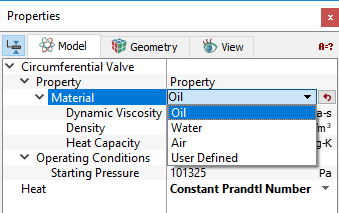
The Circumferential Valve template has following parameters assigned to the fluid volumes. They are Geometric Entities Panel > Volumes > [Desired Volume] Properties Panel > Model Tab >Circumferential Valve > [Desired options]. The template has additional conditions which apply to selected volumes in the simulation under Circumferential Valve module. These below attributes apply to Volumes only. Each volume may be assigned specific independent attributes.
|
Output
Primary and Derived variables can be integrated over a selected boundary and stored in the ASCII format file filename_integrals.txt for subsequent Post-Processing. These data can also be displayed real-time in the GUI using the X-Y Plots feature. The quantities available for output depend on the boundary type as listed below:
The desired output can be activated for a selected boundary in the Model Tab of the Properties Panel. The outputs which can be activated are specified as User Select (Area, Normal). The valve related output variables are available under the Rotation (1 DOF) module.
When monitoring Points are created as part of the simulation, the output quantities are stored in the ASCII format file filename_points.txt for subsequent post-processing.sd