中文 English
You are here: Tutorials > Sand Erosion > Setting up the model > Defining Physics and Conditions

Defining Physics and Conditions

The physics and conditions are specified as follows.

Add Modules
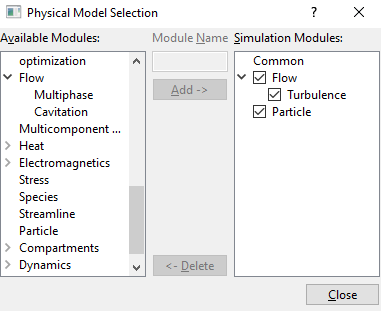
  1. Click Select Modules in the Model Panel. The Physical Model Selection dialog box opens.
  2. Select Turbulence under Available Modules list and click Add.
  3. Select Particle under Available Modules list and click Add.
  4. Click Close to close the Physical Model Selection dialog box.
 

Figure 11.308 - Adding modules

Particles
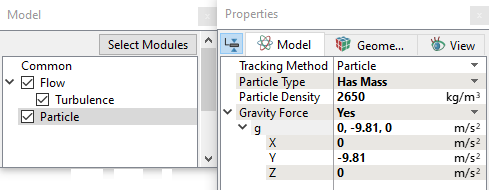
  1. Select Particle in the Model Panel.
  2. Select Has Mass for Particle Type drop-down list in the Properties Panel.
  3. Enter 2650 kg/m3 for Particle Density.
  4. Select Yes for Gravity Force drop-down list.
  5. Enter g = 0, -9.81, 0 m/s2 in the Gravity Force list.


Figure 11.309 - Particle properties

Boundary conditions

The boundary conditions are specified as follows:
Inlet
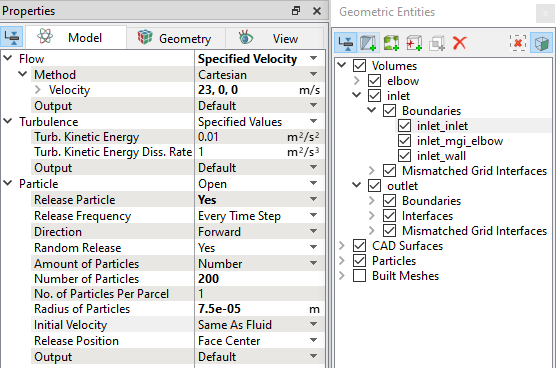
  1. Select inlet_inlet from the Boundaries list in the Geometric Entities Panel.
  2. Select Specified Velocity from the Flow drop-down list in the Model Tab of Properties Panel.
  3. Enter 23, 0, 0 m/s for Velocity under Flow.
  4. Select Yes for Release Particle drop-down list under Particle list.
  5. Enter 200 for Number of Particles.
  6. Enter 7.5e-05 m for Radius of Particles.
 

Figure 11.310 - Inlet conditions

Outlet
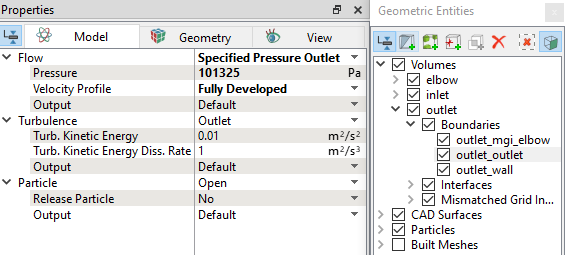
  1. Select outlet_outlet from the Boundaries list in the Geometric Entities Panel.
  2. Select Specified Pressure Outlet from the Flow drop-down list in the Model Tab of Properties Panel.
  3. Enter 101325 Pa for Pressure under Flow.
  4. Select Fully Developed from the Velocity Profile drop-down list.


Figure 11.311 - Outlet conditions

Elbow
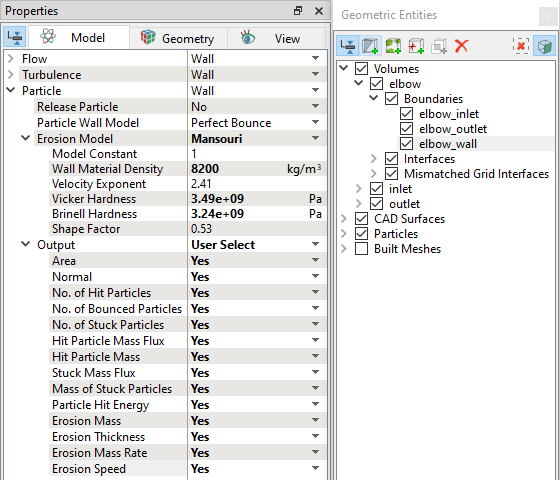
  1. Select elbow_wall from the Boundaries list in the Geometric Entities Panel.
  2. Select Mansouri from the Erosion Model drop-down list under Particle.
  3. Enter 8200 kg/m3 for Wall Material Density under Erosion Model.
  4. Enter 3.49e+09 Pa for Vicker Hardness under Erosion Model.
  5. Enter 3.24e+09 Pa for Brinell Hardness under Erosion Model.
  6. Select User Select for the Output drop-down list under Particle.
  7. Select Yes for all variables under Output as shown in Figure 11.312.


Figure 11.312 - Elbow conditions

  Note: For more information on Erosion model, refer Erosion Model.


Fluid Properties
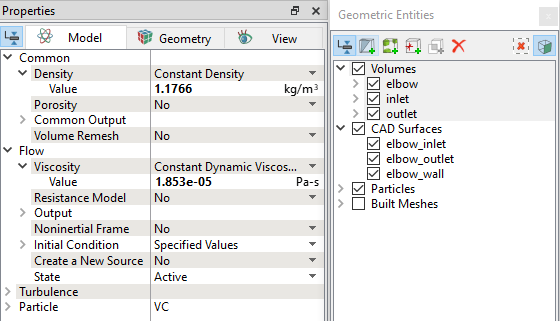
  1. Select the Volumes in the Geometric Entities Panel.
  2. Select Model Tab in the Properties Panel.
  3. Enter the Value = 1.1766 kg/m3 under Density for the Common list.
  4. Enter the Value = 1.853e-5 Pa-s under Viscosity for the Flow list.


Figure 11.313 - Properties for Air


Copyright © 2023 Simerics Inc.,