中文 English
You are here: Geometry and Mesh > Geometry Preparation > Import/Export Geometry or Grid

4.1.1 Import/Export Geometry or Grid

This section explains the set of operations used to import CAD Surface and/or Grids. These options are accessed as follows:

Mesh Panel > Import/Export Geometry or Grid.

The related operations are available in the Properties Panel.
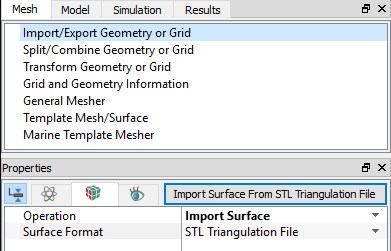


Figure 4.1 - Import/Export geometry or grid

Operation

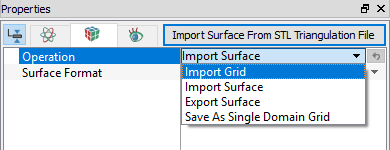
The Operation drop down list contains the following:

  • Import Surface
  • Import Grid
  • Export Surface
  • Save as Single Domain Grid
 

Figure 4.2 - Operation

The details of the import/export are as follows:

Operation Description
Import Surface
  • STL files are used as the primary format for importing Surfaces (Geometry) into Simerics-MP/ Simerics-MP+.
  • STL files define only Surfaces (using triangles defined in terms of vertices and normals) and contain no information on how that Surface was created.The surfaces are represented using triangles defined in terms of vertices and normals.

Import Grid
  • Allows to import 3D Grid, 2D Grid, Axisymmetric Grid.
  • Grid Formats-Simerics Grid (.sgrd), Ansys CDB File (.CDB), Gambit Neutral files (ASCII), GridPro Files, and Nastran Grid Files (.CTRIAR, .CQUADR elements etc) are imported.
Export Surface
  • Exports any surface from Simerics-MP and save it with .STL format.
Save As Single Domain Grid
  • Saves the grid file.

Table 4.1 - Operation


Copyright © 2023 Simerics Inc.,