3.3 Properties Panel
3.3.3 View Tab
This controls the viewing window image. It allows the user to enable or disable the Surface, Global Parameters, Grid, Outline, Vector, Surface Side, Transparency etc. For example, refer to Post Processing-Display.
 Description
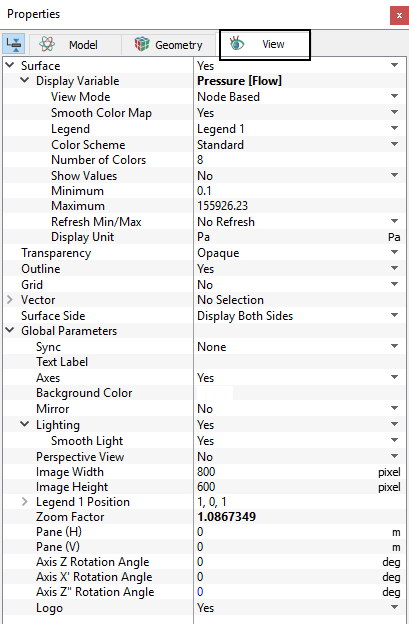
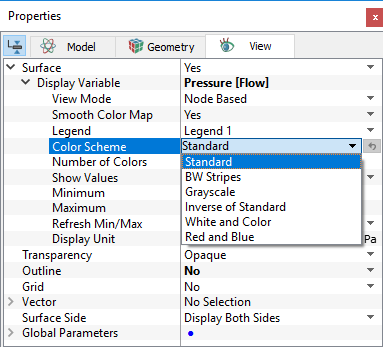
Figure 3.18 - View tab
Surface
This enables the display of the Primary Variables, Physical Properties, or Derived Variables or a solid color on selected geometric entities, specifically Boundaries, Derived Surfaces, Interfaces, CAD Surfaces, and/or Volumes.
Display VariableThis allows to select Primary Variables, Physical Properties, or Derived Variables for display. For more information on Variable, refer the Output Variable of each modules.
|
TransparencyThis controls the degree of transparency or opaqueness of a surface. Following display options are available in Transparency. For reference, see Figure 12.45 - Figure 12.48.
|
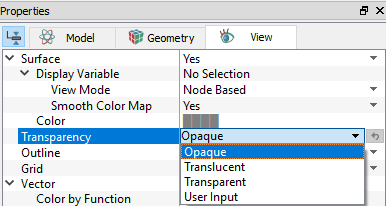
Figure 3.20 - Transparency |
Outline
This enables the display of the outline on selected geometric entities, specifically Boundaries, Derived Surfaces, Interfaces, CAD Surfaces, Points and/or Volumes.
|
Note: If no surface is displayed, a red outline is displayed, whether or not outline has been activated. |
Grid
This enables the display of the Grid (Mesh) on selected geometric entities, specifically Boundaries, Derived Surfaces, Interfaces, CAD Surfaces, and/or Volumes.
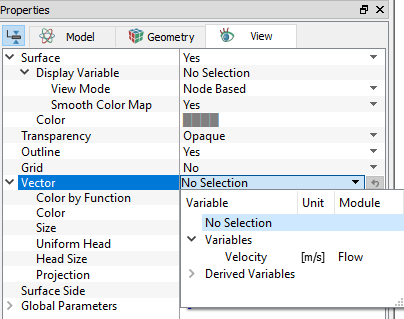
VectorThis enables the display of vectors on selected geometric entities, specifically Boundaries, Derived Surfaces, Interfaces, CAD Surfaces, Points and/or Volumes. It offers following options for Vector.
|
Figure 3.21 - Vector |
|
Note: Surface, Outline, Grid, and Vector display for a selected geometric entity may also be activated using the check box in front of the respective label in the Results Panel. |
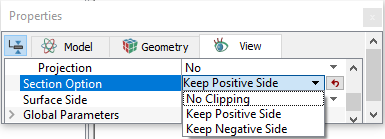
Section OptionIf Section is activated, then following features are available for Section Option:
For more information, check Section in the Post-Processing. |
Figure 3.22 - Section option |
|
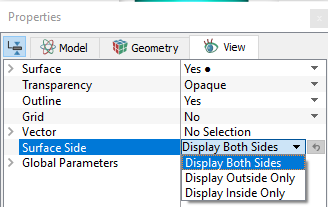
Surface SideThis provides the option to display as follows:
For more information, check Display in the Post-Processing. |
Figure 3.23 - Surface side |
Global Parameters
|
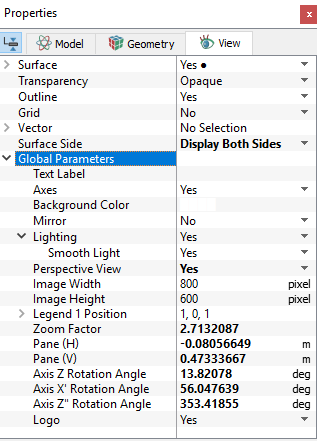
Figure 3.24 - Global parameters |