|
You are here: Marine Templates and Tutorials > Marine Hull Template > Marine Tutorials > Defining Physics
|
Defining Physics
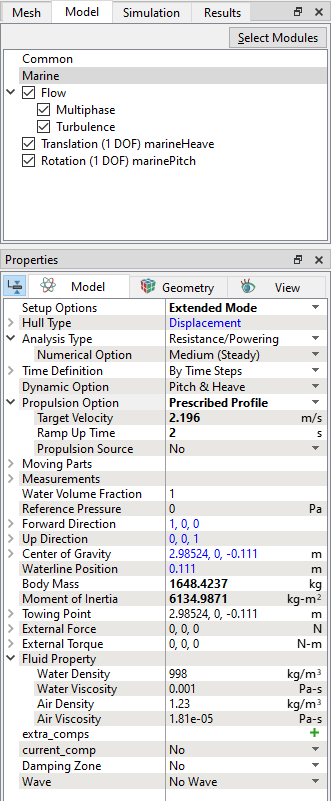
In this simulation, we prescribe the propulsion by a profile, without using an actual propeller model. Once the mesh for the domain is created using the Marine Template Mesher, the Marine model is automatically added to the Model Panel. The Flow module along with the settings for Multiphase and Turbulence is also enabled. The physics and conditions are specified in the Marine model as follows.
The parameters Hull Type, Analysis Type, Forward Direction, Up Direction, Center of Gravity, Waterline Position are preset from values given in the Marine Template Mesher and are displayed in blue color as shown in Figure 8.40. |