中文 English
Building the Mesh

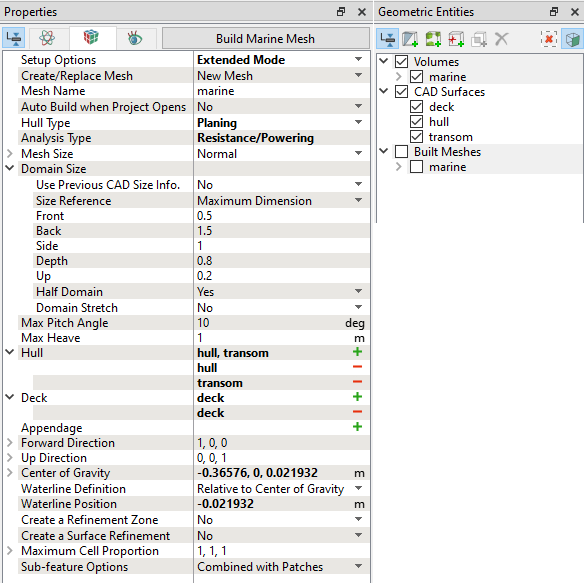
The steps involved in creating the mesh for the computational domain are :

  1. Select the Marine Template Mesher in the Mesh Panel
  2. Select Extended Mode for the Setup Options drop-down list .
  3. Select New Mesh under Create/Replace Meshin the Properties Panel
  4. Enter marine under Mesh Name.
  5. Select Analysis Type as Resistance/Powering.
  6. Select Normal in the Mesh Size drop down list.
  7. Click Build Marine Mesh. The well resolved mesh marine for the computational domain is created and displayed under the Built Meshes in the Geometric Entities Panel.
  Note : For general information about the above specifications, check mesh.

Figure 8.52 - Mesh settings


The mesh created for the defined computational domain is shown below along with Volume Fraction of water.
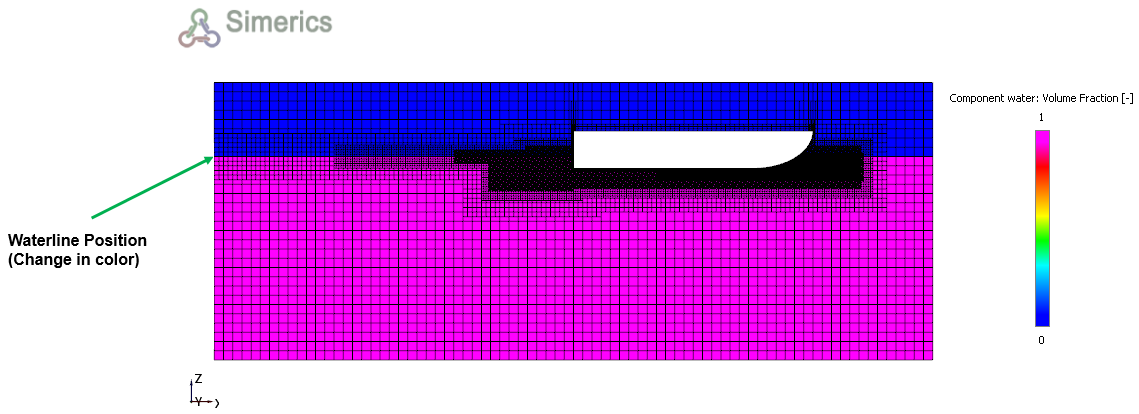
 

Figure 8.53 - Sectional view mesh for planing hull


Copyright © 2023 Simerics Inc.,