Building the Mesh
The steps involved in creating the mesh for the computational domain are :
|
- Select the Marine Template Mesher in the Mesh Panel.
- Select New Mesh under Create/Replace Mesh in the Properties Panel.
- Enter marine under Mesh Name.
- Select Normal Mode for the Setup Options drop-down list.
- Select Analysis Type as Resistance/Powering.
- Select Medium Coarse under Mesh Size drop down list.
- Click on Build Marine Template Mesher Mesh. The well resolved mesh marine for the computational domain is created and displayed under the Built Meshes in the Geometric Entities Panel.
| |
Note : For general information about the above specifications, check mesh. |
|
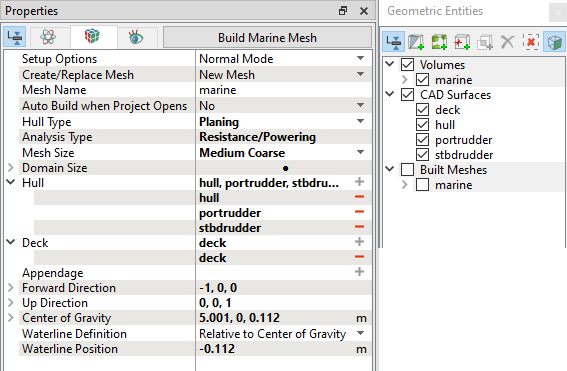
Figure 8.66 - Mesh settings
|
The mesh created for the defined computational domain is shown below along with Volume Fraction of water.
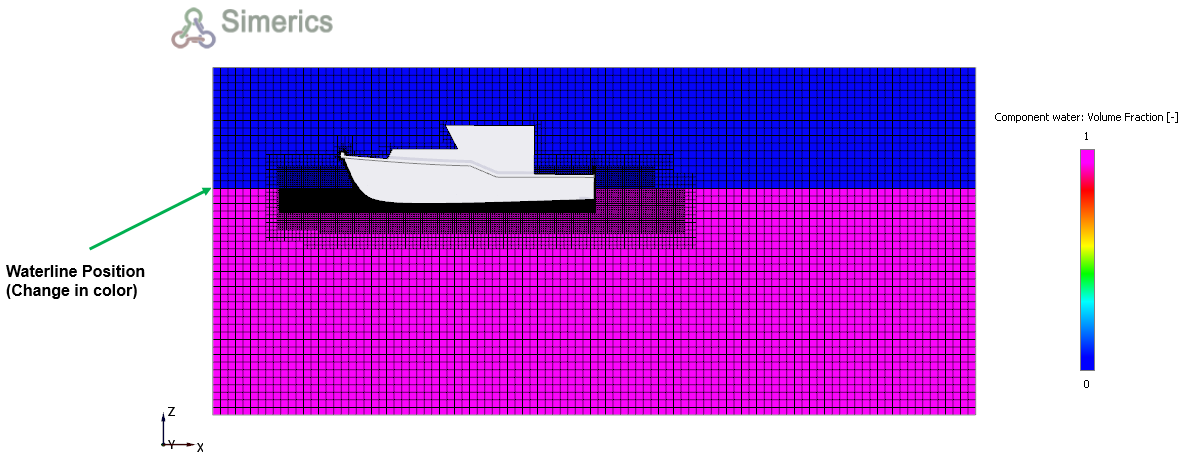
Figure 8.67 - Sectional view mesh for self propelled boat