|
You are here: Marine Templates and Tutorials > Marine Hull Template > Marine Tutorials > Defining Physics
|
Defining Physics
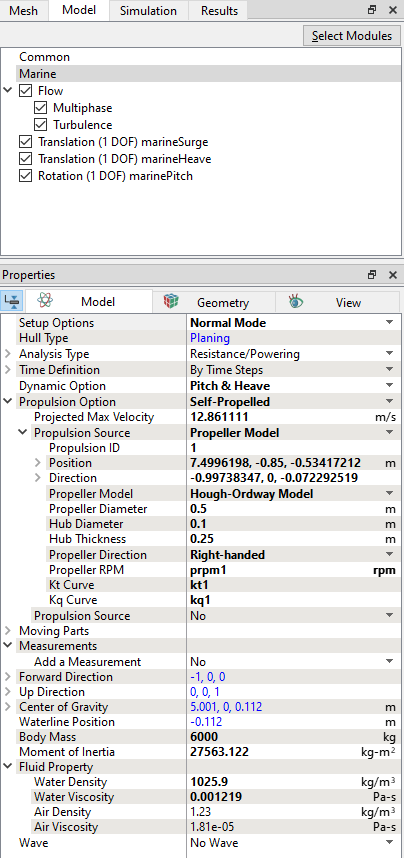
In this simulation, we prescribe the Self-Propelled as propulsion option. Once the mesh for the domain is created using the Marine Template Mesher, the Marine model is automatically added to the Model Panel. The Flow module along with the settings for Multiphase and Turbulence is also enabled. The physics and conditions are specified in the Marine model as follows.
 icon under Coordinates to open the Expression Editor dialog box. icon under Coordinates to open the Expression Editor dialog box. Description Description
#==================================================== prpm1 = 1500 kt1 = table(kt1.txt, marine.prop_J1) kq1 = table(kq1.txt, marine.prop_J1) plot.J_prop1 = marine.prop_J1 plot.Kt_prop1 = kt1 plot.Kq_prop1 = kq1 plot.Eta_prop1 = marine.prop_J1 * kt1 / (2 * pi * kq1) prop1_diameter = 0.5 plot.Thrust_prop1 = marine.prop_T1 #plot.Thrust_prop1: [N] plot.Torque_prop1 = marine.prop_torque1 #plot.Torque_prop1: [N-m] plot.Power_prop1 = marine.prop_power1 #plot.Power_prop1: [W] Ensure to include the table for Kt Curve (thrust coefficient as a function of advance coefficient) and Kq Curve (torque coefficient as a function of advance coefficient) in the working directory of the project. Incase of unavailability of the above tables, ensure to copy the following files from the tutorial folder into the working directory. Enter the parameters for the extended Fluid Property list as follows.
The parameters Hull Type, Analysis Type, Forward Direction, Up Direction, Center of Gravity, Waterline Position are preset from values given in the Marine Template Mesher and are displayed in blue color as shown in Figure 8.68. |
|