5.12 Dynamics
In many fluid engineering components/systems, there are moving (translational and/or rotating) parts or walls involved. For the flow relative to moving objects, the flow passages, in many situations, remain unchanged under moving reference frames (e.g., centrifugal pumps and impellers). However, more often than not, the flow domains not only move relative to each other, but the solid boundaries may also move and/or deform with time to cause the volumetric zones changing accordingly (e.g., vane pumps and bearings). As a result, the volume mesh of the computational domain should be adjusted accordingly to accommodate the geometric changes. In both scenarios, to define/redefine the flow domain and computational meshes, the motions of the moving objects (wall boundaries for a flow domain), are required, which can be either explicitly described or obtained by dynamic consideration (force balance).
In this module Dynamics, in addition to the directly prescribed motions of wall boundaries, the rigid body theory is also applied to determine the translational and rotational motions of a moving object. The ordinary differential equations (ODE) based on balance of linear and angular momentum will be first described for translation and rotation, respectively. They are then followed by the presentation of the ODE solver methods adopted. Finally, the model parameters and settings, the work flow and the post-processing quantities are also to be discussed in detail.
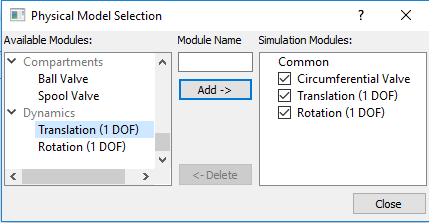
The two modules of Dynamics motion offered in Simerics-MP are: Translation (1 DOF) and Rotation (1 DOF).
|
To activate the Translation (1 DOF)/Rotation (1 DOF) module:
|
Figure 5.267 - Dynamics module |
|
Note: The implementation of a Dynamics module, in particular for Boundaries, is usually associated with the Volume remesh option in the Common module. The reason for this association is that there needs to be a method to move or deform the mesh associated with a dynamic volume or boundary. |
The module is explained as follows:
- Definitions: Terminologies used in the Dynamics module.
- Physics: Models, methods and constants used in the Dynamics module.
- Conditions: Specifying conditions for the entities-boundaries, interfaces, volumes under the Dynamics module.
- Output Variables: Outputs from the Dynamics module.