Source
The Source is a volume condition in the Flow module pertaining to selected Volumes. To specify the source, click Create a New Source (see Figure 5.24) in Flow module as follows:
- Geometric Entities Panel > Volumes > [Desired Volume]
- Properties Panel > Model Tab > Flow > Create a New Source
|
Create a New Source allows the introduction of a mass source or a momentum source into a selected volume. The mass may be added as a Mass Source Per Volume (kg/m3)/s or a Total Mass Source (kg/s). A positive Value of either the Mass Source Per Volume or the Total Mass Source will add mass to the volume. A negative Value will remove it. The momentum may be added as Momentum Source Per Volume (N/m3) or a Total Momentum Source (N). Momentum is a vector quantity and is added in terms of |
 components. For a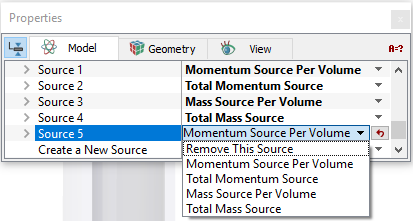

|
5.76 |
For a Momentum Source Per Volume, the source is Momentum/second per Volume which has units of (kg-m/s2/m3) which is equivalent to a force per volume (N/m3).

|
5.77 |
Remove This Source
This removes the source in a selected Volume.
|
Note: If no source has been created, the Source heading is not visible. Multiple sources are numbered sequentially, e.g. Source 1, Source 2, Source 3, etc. If a source is removed, the remaining sources are renumbered starting at 1. |