5.2.3 Conditions
This section discusses the settings for the Flow module.
Click Flow in the Model Panel. The following conditions and parameters are available in the Properties Panel:
- Converge Criterion: When the correction for the solved variables drops below the specified value, the code will stop (Steady) or move to the next time-step (Transient).
- Numerics: Parameters and schemes used to solve the equations.
- Use Gauge Pressure: Gauge pressure is the pressure relative to a reference pressure, which is typically atmospheric pressure. To specify the pressure values in gauge scale, select “Yes” to use gauge pressure option.
- Gravity Force: The effects of gravitational acceleration are incorporated in the Flow module by activating the Gravity Force option to “Yes” and specifying a gravity vector
 as as  . .
- Max. Velocity Magnitude: Limits how large the velocity field can become to control solution convergence during the iteration process.
- Max. Velocity Adjustment: Limits how large the velocity correction terms for the velocity field can become to control solution convergence during the iteration process.
- Reference Pressure Location: For a closed system (one which is not linked to a specified pressure) with incompressible fluid, the pressure solution is not unique. In order to anchor the pressure solution, this parameter allows to set the absolute pressure at a selected grid cell to that of the initial value. If it is left at the default value of -1, the pressure inside the domain is not fixed at any specific point.
|
|
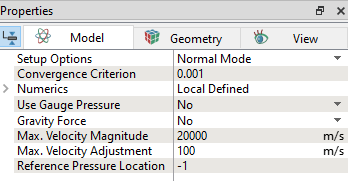
Figure 5.17 - Properties
|
| |
Note: When a template is used, Extended Mode has to be selected for Setup Options to view all the parameters.
|
The settings for the fluid domain under the Flow module are classified under the following categories: