中文 English
You are here: Physics Modules > Heat > Conditions > Initial Condition and State

Initial Condition and State
Initial Condition
The Initial Condition is a volume condition in the Heat module pertaining to selected Volumes.This refers to the values of the independent variables used to start a simulation when the Start from Initial Values option is selected in the Simulation Panel. The volumes are initialized with Specified Temperature as follows:

Geometric Entities Panel > Volumes > [Desired Volume]

Properties Panel > Model Tab > Heat > Initial Condition

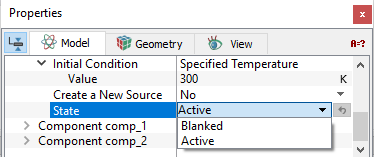
The corresponding temperature is specified under Value. By default, the Initial Temperature is 300K.


Figure 5.150 - Heat interface conditions

State

The State (see Figure 5.150) of a Volume within the Heat module determines whether the energy equation is solved (Active) or not solved (Blanked) within that volume. Setting the State of a volume to Blanked for the Heat module is equivalent to freezing its temperature at the initial value. The State is specified as follows:

Geometric Entities Panel > Volumes > [Desired Volume]

Properties Panel > Model Tab > Heat > State > [Active or Blanked]


Note: When the Multicomponent Mixing Module or the Multiphase Module are active, the State for volumes is the same as for a single fluid except that it is found under the Mixture panel.


Copyright © 2023 Simerics Inc.,