|
To create and visualize the flow streamlines as "noodles", animation parameters are specified as follows:
- Geometric Entities Panel > Streamline > [Desired Streamline]
- Properties Panel > Model Tab > [Desired Option]
The following settings are available for viewing a streamline:
- Line Thickness: Determines the diameter of the streamline “noodles”.
- Animation Time Size: Determines the visual particle displacement by integrating the particle velocity. The “noodle” flow speed is the specified value times the local flow velocity. A value of 1 indicates that the animation “noodles” have the same velocity as the local velocity.
- Maximum Integral Steps: Limits how far the streamline algorithm would be used to track a streamline. A smaller number would reduce the computing time, but a very small value may end a streamline too earlier than desired.
For further details on creating a streamline, refer post-processing.
|
|
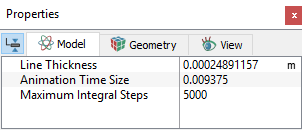
Figure 5.266 - Streamline - Viewing option
|