|
You are here: Optimization Module and Tutorial > Optimization of 2D Shape Tutorial > Setting up the model > Preparation of CAD Surfaces
|
Preparation of CAD Surfaces
|
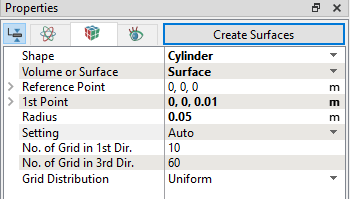
Figure 9.17 - Creating CAD Surfaces |
| ´ | Note: CAD Surfaces for this tutorial are primarily created as reference to highlight the change of 2D shape and will be used during Post-processing. |