|
You are here: Optimization Module and Tutorial > Optimization of 2D Shape Tutorial > Post processing
|
9.1.4 Post processing
In the current version of optimization tutorial, the summary of optimization results from multiple simulations are written to a text (.txt) file (2D_shape_optimization_model _optim_result.txt).
This can be imported into Excel for further Post-processing, as described in this section.
Other relevant Post-processing options for this section includes:
Importing Text (.txt) files into Excel to create Plots
- Open a new worksheet in Excel (Mention exact file name).
-
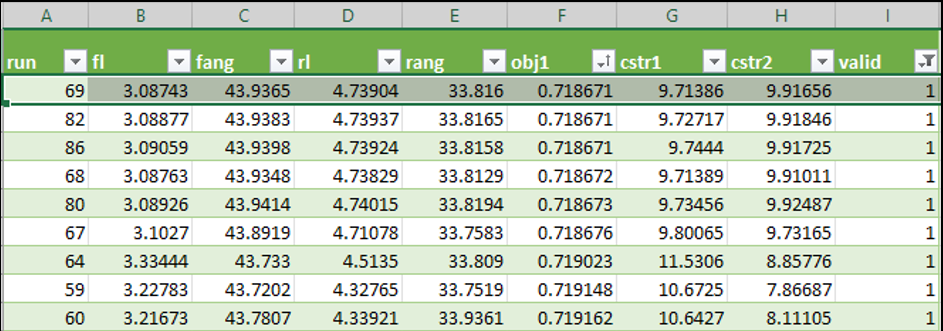
Select Data > click From Text/CSV > select the text file 2D_shape_optimization_model _optim_result.txt and click Load (see, Figure 9.35).
-
Values for Objective, Constraints, Variables and Valid are displayed for all Optimization runs.
-
Select all the column headers, click Data and click Filter in Sort & Filter tab.
-
Click the arrow next to obj1.
-
Click Sort Smallest to Largest.
-
The last column valid contain values of either 0 or 1. If it is 0, then that specified run is not valid as it did not satisfy the constraints.
-
Click the arrow next to valid.
-
Click Number Filters and then Greater Than and enter 0. All the valid runs are only displayed.
-
In the Figure 9.35, results of the run with lowest Drag Coefficient is highlighted.
| ´ | Note: Randomness involved in the process of optimization. Each Optimization run results are different, even though there are no change in the variables and constraints. |