|
The Results Panel is used to post process the results during the simulation or once the simulation is completed. It also lists the different variables that can be accessed and displayed in the Display Panel.
The available options under the Results Panel are as follows:
- Surface: Enables the display of geometry or volume. For more info, See Figure 12.9
- Grid: Enables the display of the Grid (Mesh) on selected geometric entities, specifically boundaries or volumes. For more info, See Figure 12.7.
- Outline: Enables the display of the outline on selected geometric entities.
- Vector: Enables the display of vectors on selected geometric entities. For more info, See Figure 12.11.
- Variable: Enables the display of the Primary Variables, Property Variables, and Derived Variables on selected geometric entities, specifically Boundaries, Derived Surfaces, Interfaces, CAD Surfaces, and Volumes (see, Figure 3.36). Integrated variables (defined through expression editor) can also be accessed in the variable list.
-
Cell Based View: Displays color maps for surfaces based on the computed value of the control volume cells.
| |
Note: Simerics-MP uses a control volume approach, the Cell Based View corresponds directly to the solution.
|
-
Node Based View: Displays color maps for surfaces based on interpolation of parameters to the corners (Nodes) of the control volumes.
| |
Note: The Node Based View provides a smoother (interpolated) view of the variable color map.
|
-
Smooth Color Map: Switches between Smooth vs. Stepped color maps for surfaces. If Smooth Color Map is checked, the transition of colors over the surface is continuous, providing a smooth map.
-
Minimum: Color map range can be manually adjusted to minimum range.
-
Maximum: Color map range can be manually adjusted to maximum range.
-
Refresh Min/Max  : The top icon : The top icon  Options for updating the global minimum and maximum range. The bottom icon Options for updating the global minimum and maximum range. The bottom icon  Option enables updating the local minimum and maximum range Option enables updating the local minimum and maximum range
|
|
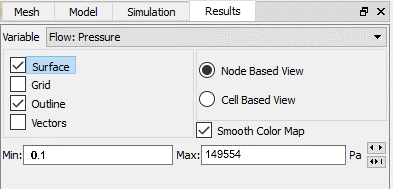
Figure 3.35 - Results panel
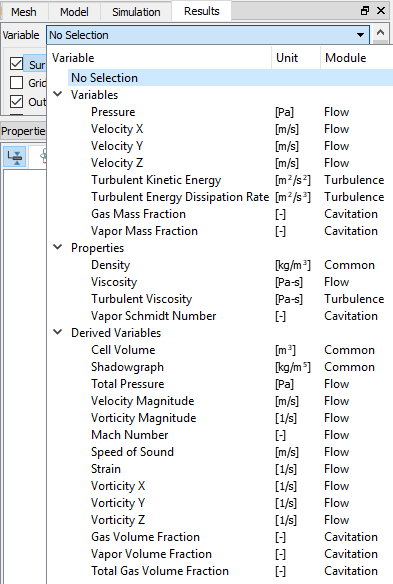
Figure 3.36 - Variable list
|