5.8.3 Conditions
This section discusses the settings for the Multicomponent Mixing module.
Click Multicomponent Mixing in the Model Panel. The following conditions and parameters are available in the Properties Panel.
-
Components: The plus/minus signs allow the user to add or remove components of the mixture. The components will be named comp_1, comp_2, etc. The components can be renamed by double clicking on the tab containing their respective names. The fluid properties of the components are specified in the appropriate modules (e.g. Flow, Heat, and Common).
-
Converge Criterion: When the correction for the solved variables drops below the specified value, the code will stop (Steady) or move to the next time-step (Transient).
- Numerics: Parameters and schemes used to solve the equations.
-
Soret Effects: This option allows the user to account for mass flux due to a temperature gradient and appears in the multi-component continuity equation, where each component has its own diffusional velocity. Soret Effects can be activated by selecting Yes. The Thermodiffusion Coefficient is calculated based on the kinetic theory for the components under Multicomponent Mixing when Soret Effects is set to Yes.
|
|
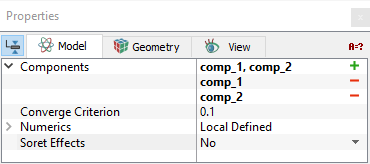
Figure 5.177 - Conditions
|
| |
Note: When a template is used, Extended Mode has to be selected for Setup Options to view all the parameters.
|
The settings for the fluid domain in the Multicomponent Mixing module are classified under the following categories: