Material Property
|
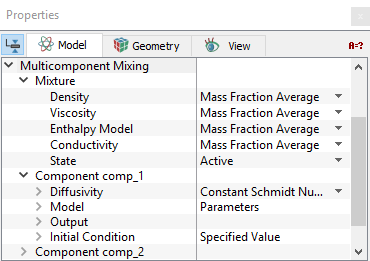
Material properties are volume conditions in the Multicomponent Mixing module pertaining to selected Volumes. The properties and conditions for the components and mixtures are specified in different modules-Flow, Heat and Common. The properties under the Multicomponent Mixing module are interlinked with the properties under the same name in other modules. |
Density
The method for computing Density of the mixture can be specified under both the Multicomponent Mixing and Common modules as follows:
- Geometric Entities Panel > Volumes > [Desired Volume]
- Properties Panel > Model Tab > Multicomponent Mixing > Mixture > Density > [Mass Fraction Average or User Specified]
or
- Geometric Entities Panel > Volumes > [Desired Volume]
- Properties Panel > Model Tab > Common > Mixture > Density > [Mass Fraction Average or User Specified]
|
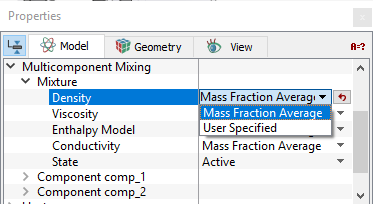
Density of a mixture is computed from the densities of the individual components using either of the two methods:
|
Figure 5.179 - Density option |
The Density of the components are specified only under the Common module as any of the following: Constant Density, Ideal Gas Law, Isentropic Gas Law, Compressible Liquid or User Specified using the Expression Editor.
Specify the Density for the components as shown below:
- Geometric Entities Panel > Volumes > [Desired Volume]
- Properties Panel > Model Tab > Common > Component {Name of the Component} > [Desired Option]
Viscosity
The Viscosity for the mixture can be specified under both the Multicomponent Mixing and Flow module as follows:
- Geometric Entities Panel > Volumes > [Desired Volume]
- Properties Panel > Model Tab > Multicomponent Mixing > Mixture > Viscosity > [Mass Fraction Average or Kinetic Theory or User Specified]
or
- Geometric Entities Panel > Volumes > [Desired Volume]
- Properties Panel > Model Tab > Flow > Mixture > Viscosity > [Mass Fraction Average or User Specified]
|
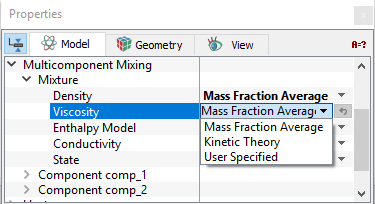
Viscosity of a mixture is computed from the viscosities of the individual components using either of the three methods:
|
Figure 5.180 - Viscosity option |
The Viscosity of the components are specified only under the Flow module as any of the following: Constant Dynamic Viscosity, Constant Kinematic Viscosity, Sutherland Law, Bingham Models, Herschel-Bulkley Model, User Defined Function (Non Newtonian) or User Specified using the Expression Editor.
Specify the Viscosity of the components as shown below:
- Geometric Entities Panel > Volumes > [Desired Volume]
- Properties Panel > Model Tab > Flow > Component {Name of the Component} > [Desired Option]
| Note: When the Viscosity for the mixture is set to Kinetic Theory, the Viscosity for the components are also set to Kinetic Theory by default. |
For Multicomponent Mixing flow problems involving heat transfer, the following conditions, Enthalpy Model and Conductivity are specified.
Enthalpy Model
The Enthalpy Model for the mixture can be specified under both the Multicomponent Mixing and Heat module as follows:
- Geometric Entities Panel > Volumes > [Desired Volume]
- Properties Panel > Model Tab > Multicomponent Mixing > Mixture > Enthalpy Model > [Mass Fraction Average or User Specified]
or
- Geometric Entities Panel > Volumes > [Desired Volume]
- Properties Panel > Model Tab > Heat >Mixture > Enthalpy Model > [Mass Fraction Average or User Specified]
|
Enthalpy Model of a mixture is computed from the enthalpies of the individual components using either of the two methods:
|
Figure 5.181 - Enthalpy option |
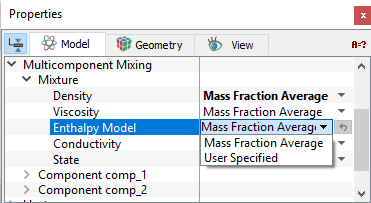
The Enthalpy Model of the components are specified only under the Heat module as any of the following: Constant Capacity, JANAF Table, User Defined Function (Non Newtonian) or User Specified using the Expression Editor.
Specify the Enthalpy Model of the components as shown below:
- Geometric Entities Panel > Volumes > [Desired Volume]
- Properties Panel > Model Tab > Heat > Component {Name of the Component} > Enthalpy Model > [Desired Option]
When the Conductivity of the mixture is set to Kinetic Theory, the Enthalpy Model for the components in the Heat module is also set to Kinetic Theory. It allows us to specify the Degrees of Freedom. The Degrees of Freedom has a default value of 3 representing the three translational directions. A value of 6 would include the three rotational directions in addition to the translation directions. Any number greater than 6 would include as many vibrational modes as desired in addition to the translational and rotational modes.
Conductivity
Conductivity of a mixture can be specified under both the Multicomponent Mixing and Heat module as follows:
- Geometric Entities Panel > Volumes > [Desired Volume]
- Properties Panel > Model Tab > Multicomponent Mixing > Mixture > Conductivity > [Mass Fraction Average or Kinetic Theory or User Specified]
or
- Geometric Entities Panel > Volumes > [Desired Volume]
- Properties Panel > Model Tab > Heat > Mixture > Conductivity > [Mass Fraction Average or Kinetic Theory or User Specified]
|
Conductivity of a mixture is computed from the conductivities of the individual components using either of the two methods:
|
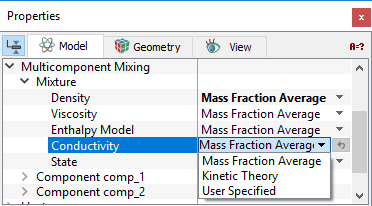
Figure 5.182 - Conductivity option |
The Conductivity of the components are specified only under the Heat module using any of the following: Constant Prandtl Number, Constant Conductivity, Kinetic Theory.
Specify the Conductivity of the components as shown below:
- Geometric Entities Panel > Volumes > [Desired Volume]
- Properties Panel > Model Tab > Heat > Component {Name of the Component} > Conductivity > [Desired Option]
| Note: When the Density of the mixture is set to Kinetic Theory, the Conductivity is also set to Kinetic Theory by default. |
Diffusivity
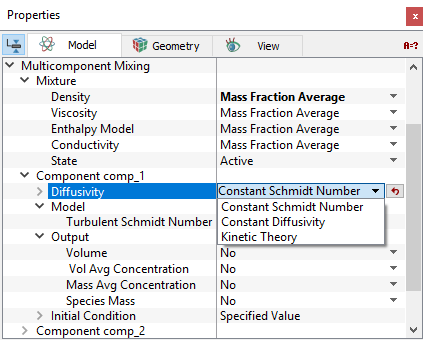
This allows to specify the method to compute the diffusivity. Except when using kinetic theory, the Diffusivity is currently only a function of the individual components, regardless of the mass fractions of the surrounding components. Diffusivity of a component can be specified under the Multicomponent Mixing module as follows:
- Geometric Entities Panel > Volumes > [Desired Volume]
- Properties Panel > Model Tab > Multicomponent Mixing > Component {Name of the Component} > Diffusivity > [Constant Schmidt Number or Constant Diffusivity or Kinetic Theory]
|
Constant Schmidt Number: The Diffusivity is specified with the value of Schmidt Number. The input value can be made a function using the Expression Editor. Constant Diffusivity: The Diffusivity is specified directly. The input value can be made a function using the Expression Editor. Kinetic Theory: The Diffusivity is specified using the Lennard-Jones Parameters as explained in the kinetic theory. |
Figure 5.183 - Diffusivity option |
Model
|
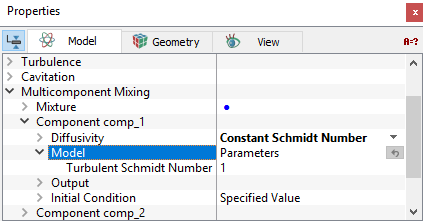
Model appears under each component for a volume under Multicomponent Mixing when the Turbulence module is activated as shown below:
The Turbulent Schmidt Number is specified under Model. The value of Turbulent Schmidt Number cannot be greater than 1. |
Figure 5.184 - Model |
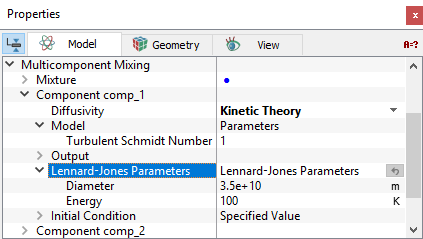
Lennard-Jones Parameters
|
The Lennard-Jones Parameters are required to be specified when Diffusivity for the individual components in a selected volume are set to Kinetic Theory. The parameters specified here are the Diameter and Energy. |
Figure 5.185 - Lennard-Jones Parameters |