中文 English

Defining Physics

This section explains the setting up of the conditions and the physics for the marine simulation after creating the mesh for the computational domain.

Once the mesh for the domain is created using the Marine Template Mesher, the Marine Model is automatically added to the Model Panel. The Flow Model with the settings for Multiphase and Turbulence is also enabled. Under this model we specify the settings for the flow and the degrees of freedom -Translation & Rotation. The physics and conditions are specified in the Marine model as follows.

Most of the initialization is done at the Marine Template Mesher. Any change to the following settings can be made only at the Marine Template Mesher.

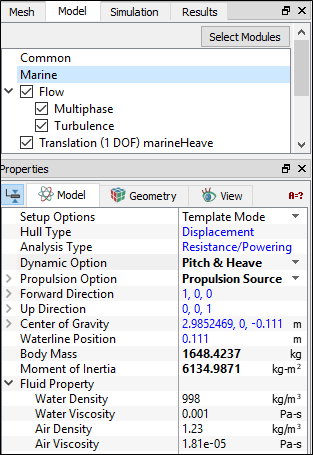
The following physics is defined as part of the Marine Model:

  • Define the Dynamic Option. Depending on our selection, the settings for the Degrees Of Freedom (DOF) categorized as (Translation and Rotation) are added in the Model Panel.
  • Select the appropriate Propulsion Option. Depending on our selection, the settings for DOF are added in the Model Panel. If a Propulsion Source is given as the Propulsion Option, an extra DOF under Translation - marineSurge is added.
  • Specify the Body Mass, Moment of Inertia of the body.
  • Define the Fluid Properties. This includes the Water Density, Viscosity, Air Density and Air Viscosity.
 

Figure 8.22 - Physics definition

Defining Degrees of Freedom

The ship motions added to the model through the Dynamic Option and the Propulsion Option are defined with their respective settings. They are classified as Translation (1 DOF) and Rotation (1 DOF).


Defining Translation DOF

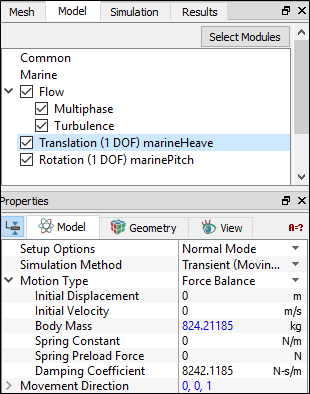
The following section contains information about the physics related to the translational motion of the vessel. The

  1. Specify the Motion Type.
    1. Prescribed - Define only the displacement (not generally used).
    2. Force Balance - Specify translational motion : Body Mass (specified in Marine Model) and Additional Force on Body are fixed. Change the Initial Displacement, Initial Velocity, Spring Constant, Spring Preload Force, and Damping Coefficient from the default values, if needed.
  2. Fix the Movement Direction. Any change needed should be made at the Marine Template Mesher.
  3. Change the Maximum and Minimum Displacements for the translational/linear motion from the default values, if needed. This controls the number of layers needed in the mesh to capture the translational motion of the vessel.


Figure 8.23 - Translational DOF definition


Defining Rotation DOF

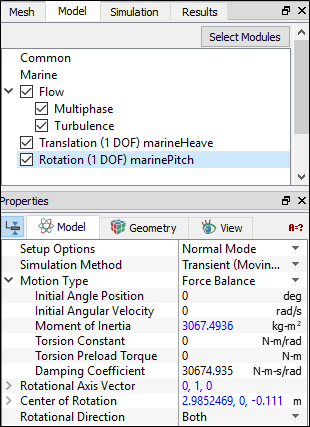
The following section contains information about the physics related to the rotational motion of the vessel.

  1. Specify the Motion Type.
    1. Prescribed - Define only the angle displacement (not generally used).
    2. Force Balance - Specify rotational motion : Moment of Inertia(specified in Marine Model) and Additional Torque on Body are fixed. Change the Initial Angle Position, Initial Angular Velocity, Torsion Constant,Torsion Preload Torque,and Damping Coefficient from the default values, if needed.
  2. Rotational Axis Vector and Center of Rotation are fixed. Any change needed should be made to settings in the Marine Template Mesher
  3. Fix the Rotational Direction of the vessel. It can be Clockwise, Counterclockwise or Both.
  4. Change the Maximum and Minimum Angle Displacements for the rotational motions from the default values, if needed. This controls the number of layers needed in the mesh to capture the rotational motion of the vessel.


Figure 8.24 - Rotational DOF definition


Copyright © 2023 Simerics Inc.,