5.1.2 Conditions
This section discusses the settings of the parameters and properties common to all the modules.
Click Common in the Model Panel, the following parameters are available in the Properties Panel:
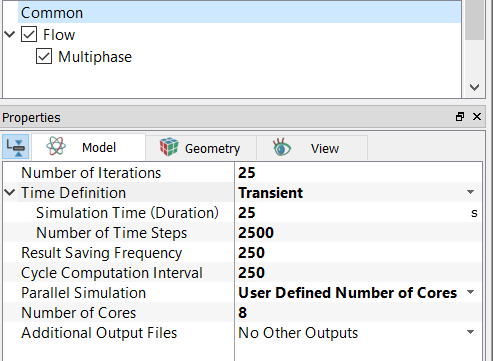
|
Note: For Steady-state simulations, the EnSight output are: filename_ensight.case filename_geo_ensight.data For transient simulations, the EnSight output are: filename_geo_1_xxxx_ensight.data filename_sca_1_xxxx_ensight.data filename_sca_2_xxxx_ensight.data filename_vec_1_xxxx_ensight.data where xxxx is the time-step. |
Density
Density is a volume condition pertaining to a selected Volume. For a single fluid, or an individual component in a Multicomponent mixture or Multiphase flow, the density is a material property with the unit of kg/m3. It follows one of the four density laws available in Simerics-MP:
As for the mixture density of multiple components, it is a weighted average of the component densities, where the weighting factors depend on the physical processes/models:
- Multicomponent Mixing: The mixture density is computed using Mass Fraction Average (Multicomponent module) or User Specified.
- Multiphase flow: The mixture density is computed using Vol. Fraction Average (Multiphase module) or User Specified.
Porosity
Porosity is a volume condition pertaining to a selected Volume. It has a value between 0 and 1. Zero porosity indicates a solid, while a porosity of 1 corresponds to a fully open flow domain.
Note that Simerics-MP adopts the superficial velocity formulation to account for the effects of porous media (Flow module). This modelling approach has the follows characteristics:
- The velocity solved is the product of porosity and the physical velocity (superficial velocity). Hence, the porosity does not appear explicitly in (and thus does not affect directly) the momentum equations.
- The momentum resistance forces induced by the porosity and the permeability of a porous medium are modelled by the addition of a momentum sink to the standard flow equations. Again, the superficial velocity is used to compute the resistance forces. The change of porosity does not directly affect the momentum resistance and thus the flow field.
- For heat transfer, under the assumption of thermal equilibrium between the fluid flow and the solid pore structures, porosity affects the heat transfer in the flow by reducing the fluid volume, or the effective volume (product of porosity and physical/cell volume) is used to discretize the energy equation.
-
In Multicomponent and Multiphase models, the porous medium model applies for both Mixture and Components.
Volume Remesh
Volume remesh feature of Simerics-MP enables the time dependent change of volume mesh to solve transient flows. This is discussed in detail in Mesh Movement.