5.10.3 Boundary Conditions
|
The boundary condition attributes for the Particle apply to Boundaries. The options also apply to Interfaces for which the Flow module is Blanked on one side of the interface, creating, in effect, a boundary. The boundary conditions and associated Particle parameters are specified as follows: |
Figure 5.222 - Particle boundary conditions |
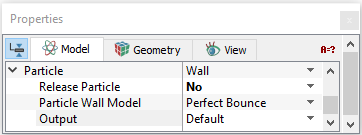
The treatment of particles or streaklines at a Boundary are specified in three ways that are:
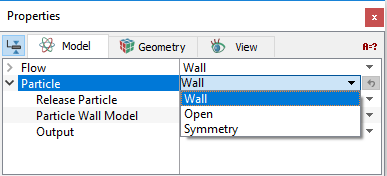
Figure 5.223 - Particle
Open
 Description
|
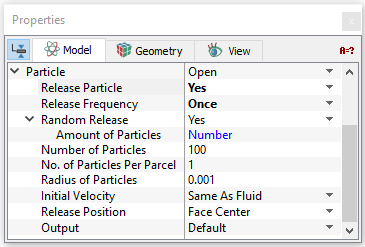
The Open boundary condition allows the streamline to enter/exit the domain. An Open boundary typically corresponds to a Flow module Inlet or Outlet, but can apply to other type Flow boundary as well. Particles can be released at an open boundary by setting Release Particle to Yes. Several additional options like Release Frequency, Random Release, Radius of Particles, Release Position, and Initial Velocity are specified for the treatment of the dynamics of particles or streaklines at a boundary. |
Figure 5.224 - Open Boundary Conditions |
Wall
Description
|
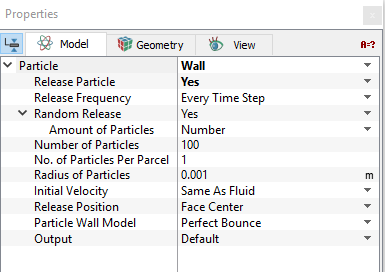
Particles can be released at a wall boundary by setting Release Particle to Yes. Several additional options like Release Frequency, Random Release, Radius of Particles, Release Position, and Initial Velocity are specified for the treatment of the dynamics of particles or streaklines at a boundary. |
Figure 5.225 - Wall boundary conditions |
Particle Wall Model
This specifies the behavior of particles or streaklines at a wall boundary. This option is only relevant and available for particles with mass, i.e. Has Mass. For Massless particles, the particle would follow the streamline along the walls.
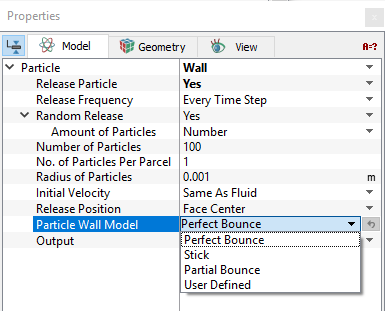
Figure 5.226 - Wall model
The Particle Wall model has the following models:
- Perfect Bounce: Particles or streaklines reflects from a wall with the same incident angle and energy. The momentum and kinetic energy of the particle is perfectly conserved, and the angle of incidence is equal to the angle of reflection in this model.
- Stick: Particles or streaklines stick to the wall.
- Partial Bounce: Particles or streaklines reflect from a wall with a loss in Normal Energy Loss and/or Tangential Energy Loss based on user input.
- Normal Energy Loss specifies the loss of the normal component of kinetic energy of a particle or streakline hitting a wall boundary with Partial Bounce.
- Tangential Energy Loss specifies the loss of the tangential component of kinetic energy of a particle or streakline hitting a wall boundary with Partial Bounce.
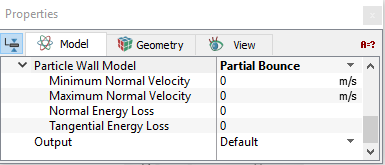
- Maximum Normal Velocity: Any particle with a magnitude of its normal velocity greater than the value specified will bounce at the wall boundary.
- Minimum Normal Velocity: Any particle with a magnitude of its normal velocity less than the value specified will bounce at the wall boundary.
If the particle’s normal velocity is in between the Maximum Normal Velocity and Minimum Normal Velocity, it will stick to the wall.
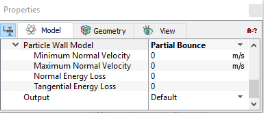
Figure 5.227 - Particle wall model (Partial Bounce)
Note: Normal Energy Loss and Tangential Energy Loss is input in terms of the fraction lost (e.g. 1.0 implies a total loss of normal energy). Normal Energy Loss and Tangential Energy Loss greater than 1.0 will be reset to 1. The Normal Energy Loss is a required input for a Wall boundary.
- User Defined: User specified behavior of particles or streaklines at a wall boundary.
Erosion Model
This specifies the model to estimate the erosion due to particle impact at a wall boundary. This option is only relevant and available for particles with mass, i.e. Has Mass.
The Erosion model has the following models:
|
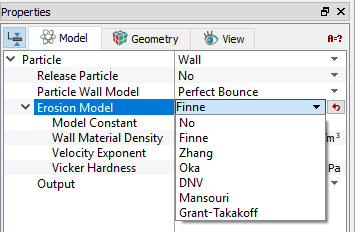 Figure 5.228 - Erosion models |
Symmetry
Description
|
Symmetry at a boundary causes particle or streaklines to reflect at the boundary. This module typically corresponds to a symmetry boundary in the Flow module. Particles can be released at a symmetry boundary by setting Release Particle to Yes. Several additional options like (Release Frequency, Random Release, Radius of Particles, Release Position, and Initial Velocity) are specified for the treatment of the dynamics of particles or streaklines at a boundary. |
Figure 5.229 - Symmetry boundary conditions |
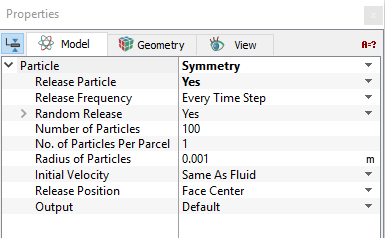
Release Particle
Particles can be released at an open, wall or symmetry boundary by setting Release Particle to Yes.
Activates the release of particles or streaklines at a boundary. To activate the release of particles, select Yes under Release Particle drop-down list.
The following options gets activated, when you select Yes:
- Release Frequency
- Random Release
- Radius of Particles
- Initial Velocity
- Release Position
Release Frequency
|
The particles can be released from a boundary to the flow just once or multiple times. This defines the release time
|
||
|
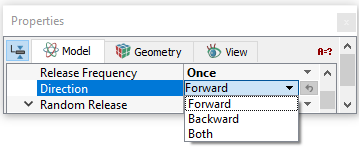
There are three options for tracing the direction of a particle released at a boundary, in case of a Massless particle:
|
Figure 5.231 - Release frequency (Once) |
 of a particle patch and the time interval
  between two releases. In
  , the particle release time interval would be
  -times the flow time-step:
  . For example,
  is directly specified.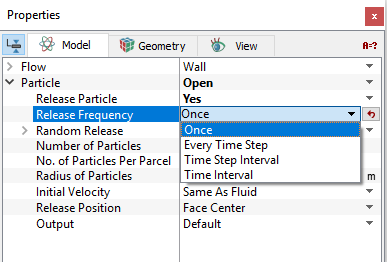
Random Release
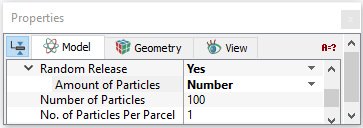
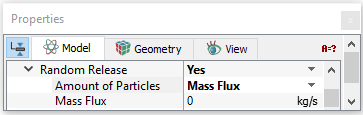
For a flow boundary, the computational mesh divides it into a finite number of faces, corresponding to the boundary cells. When particles are released from the boundary into the flow domain, the boundary cells can be selected randomly for particle release, with a probability proportional to the area of cell faces. The Amount of Particles is determined using one of the two options:
|
Figure 5.232 - Random release number |
|||
|
Figure 5.233 - Random release mass flux |
Radius of Particles
The radius of particles is specified at the release time and remains unchanged, though for multiple releases, the radius of the particles can be different (specified using the Expression Editor as a function of time). In Simerics-MP, the shape of a particle is spherical, and its volume does not displace any fluid. For a particle Has mass, the radius (diameter) is used to compute the particle mass (volume) and fluid-particle drag force (relative Reynolds number), as shown in equation 5.10.1 and equation 5.10.1.
For a particle which is Massless, the Radius of Particles influences only the size of the particle. The Radius of Particles (see Figure 5.230) must have a value greater than zero.
Initial Velocity
For each particle, the initial velocity,  is specified at the release position
  and the release time
  . The Massless particles have the same velocity as the local flow velocity,
 by default.
For Has mass particles, Simerics-MP allows the following velocity specifications.
|
Figure 5.234 - Initial velocity (Same As fluid) |
||
|
Figure 5.235 - Initial velocity (User Specified) |
 for the
 can be flow velocity at the boundary face or/and boundary cell center where the particle is located at the time of release.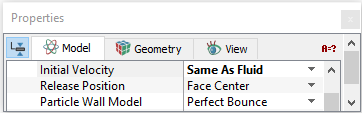

 ,
,  and
and  are the initial velocity components in a Cartesian coordinate system.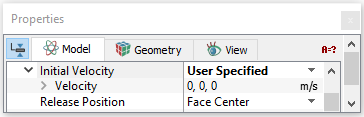
Release Position
For each particle, the starting/release position,  , is specified at the release time
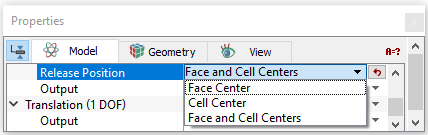
  . At a boundary, the release position can be determined by one of the three options:
In the case of release from Face and Cell Center, the number of particles released from both the cell face and center are the same, which is either determined by the number of boundary faces/ cells or the total number of particles specified in Random Release. In other words, for Face and Cell Center, the total number of particles released is twice the specified Number of Particles or the number of boundary faces/cells. It may be noted that if Random Release is set to No, Simerics-MP assumes that at every Face Center and/or Cell Center of the boundary, a particle is released. |
Figure 5.236 - Release position |
 .
.
Interface Conditions
The interface attributes are the same as for the boundary conditions, if one side of the interface has been Blanked for Flow, i.e. it is a solid wall. If, the Flow module is Active on both sides of an interface, then the particle interface is treated as a default interface and cannot be assigned any special attributes.