5.7.3 Conditions
This section discusses the settings for the Radiation module.
Click Radiation in the Model Panel. The following conditions and parameters are available in the Properties Panel.
- Converge Criterion: When the correction for the solved variables drops below the specified value, the code will stop (Steady) or move to the next time-step (Transient).
- Environment Temperature: This is important if there is any open boundary exterior to the domain. The temperature exterior to the solution domain is typically taken as ambient temperature-300 K.
- Number of Rays: Used to determine the view factors between boundaries, interfaces and sources. The greater the number of rays, the greater the precision of the view factor calculations and associated radiative heat transfer. The default number of rays is 256, which is equivalent to dividing the surface of the sphere surrounding a radiating point or surface into 28 solid angles. The greater the number of rays, the analysis becomes computationally more expensive.
- Grain Size: Size of the cell face groups used to determine view factors. The default Grain Size is 1, which corresponds to view factors being calculated for every opaque cell face.
- Source: Allows to add or remove a radiation source.
|
|
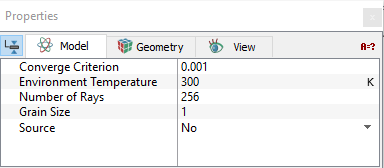
Figure 5.170 - Conditions
|
| |
Note: When a template is used, Extended Mode has to be selected for Setup Options to view all the parameters.
|
The settings for the fluid domain under the Radiation module are classified under the following categories: