Boundary Conditions
|
Each boundary may be assigned a specific independent Dynamics boundary condition attribute for translation or rotation. The boundary conditions and associated Dynamics parameters can be specified as follows: |
Figure 5.280 - Boundary condition |
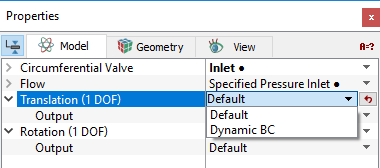
There are two boundary condition types that can be specified for a boundary under the Dynamics module for both translation and rotation. They are:
- Default: Boundary is not linked to specified dynamics.
- Dynamic BC: Creates a one-way link to the specified dynamics from a selected boundary. This couples the boundary to the ODE equation. Connecting multiple boundaries to a Dynamics module would include all their contributions (e.g. integrated pressure) to the ODE as one source. In theory, multiple Dynamics modules could be connected to a single boundary, although the resulting motion of the volume would have to include the influence of multiple ODEs.
|
Note: Assigning a boundary as a dynamic boundary condition is currently only relevant if the Flow module is active and Force Balance motion type is being used. Connecting a boundary to a Dynamics module does not cause the boundary to move. Any motion of the boundary must be specified explicitly via Volume remesh in the Common module, selecting By Dynamics under Method, and selecting Translation (1 DOF) or Rotation (1 DOF) under Dynamics. |
Output
The user can add output variables to be computed during the simulation by selecting Yes under the User Select option. The output variables that are computed for the Dynamics module are given in Output variables section.