Conditions
This section explains the conditions related to boundaries and volumes in a crescent pump simulation.
The conditions for a desired boundary are accessed as follows:
Geometric Entities Panel > Boundaries > [Desired boundary]
Properties Panel > Model Tab > Crescent > [Desired options]
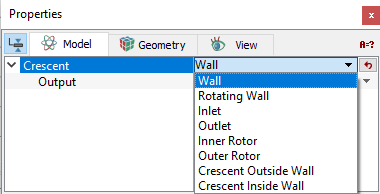
Figure 6.321 - Crescent-Conditions
- Inner Rotor: This is assigned to the inner rotor. The rotational operating conditions set under the Angular Velocity Definition are assigned to the inner rotor.
-
Outer Rotor: This is assigned to the outer rotor. The angular velocity (rpm) of the outer rotor is calculated based on the angular velocity (rpm) of the inner rotor set in the Angular Velocity Definition and the ratio: Number of Inner Teeth /Number of Outer Teeth.
- Crescent Inside Wall: This is assigned to the crescent inside wall.
-
Crescent Outside Wall: This is assigned to the crescent outside wall.
Note: The Inner Rotor, Outer Rotor, Crescent Inside Wall or Crescent Outside Wall boundary conditions are set automatically during mesh generation.
- Inlet: This specifies an inlet boundary for the crescent pump. Specified Pressure Inlet is the preferred Flow boundary condition for a crescent Inlet boundary.
- Outlet: This specifies an outlet boundary for the crescent pump. Specified Pressure Outlet is the preferred Flow boundary condition for a crescent Outlet boundary.
- Rotating Wall: This specifies a rotational velocity for the surfaces which are in contact with the rotating surfaces, typically leakage gaps. This boundary condition assumes the same values of angular velocity (rpm) and axis of rotation as the Inner Rotor as default values, but these parameters can be changed.
- Wall: This corresponds to a solid boundary and by default assigns the Wall boundary condition for Flow and other modules.
|
Note: The default values in each module under the template can be accessed and modified, by using the Extended Mode. |
|
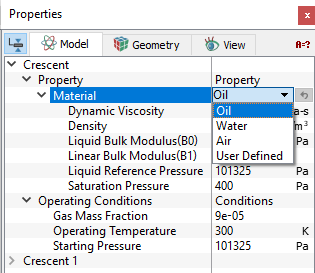
The Crescent template has conditions which apply to Volumes in the simulation under Crescent module. The conditions for a desired volume are accessed as follows: Geometric Entities Panel > Volumes > [Desired Volume] Properties Panel > Model Tab > Crescent > [Desired options]. Each volume may be assigned specific independent volume conditions.
|
Output
Primary and Derived variables can be integrated over a selected Boundaryand stored in the ASCII format file filename_integrals.txt for subsequent Post-Processing. These data can also be displayed real-time in the GUI using X-Y Plots. The quantities available for output for a boundary depend on the boundary type.
The desired output can be activated for a selected Boundary in the Model Tab of the Properties Panel. The outputs which can be activated are specified as User Select (Area, Normal).
For the boundaries specified as Inlet and Outlet, the output quantities available in the Plot Panel are Revolution Average Mass Flux, Revolution Average Volume Flux.
For the boundaries specified as Inner Rotor, Outer Rotor and Rotating Wall, the output quantity available in the Plot Panel is Revolution Average Power.
The Output Properties other than User Select, are automatically calculated and stored in the output file and may be selected and displayed in X-Y Plots.
For more information on outputs refer Output variables under each module.
When monitoring Points are created as part of the simulation, the output quantities are stored in the ASCII format file filename_points.txt for subsequent Post-Processing.