5.4.3 Conditions
This section discusses the settings for the Cavitation module.
Click Cavitation in the Model Panel. The following conditions and parameters are available in the Properties Panel:
- Converge Criterion: When the correction for the solved variables drops below the specified value, the code will stop (Steady-state) or move to the next time-step (Transient).
- Numerics: Parameters and schemes used to solve the equations.
- Model: Select the cavitation model used for the simulation.
- Cavitation Damage Model: Provides an indication of potential cavitation damage if enabled, by enabling the display of the power dissipation associated with bubble collapse.
- Model Constants: Specified as Default or User Defined. Under User Defined, the Evaporate Coefficient and Condensate Coefficient can be specified.
|
|
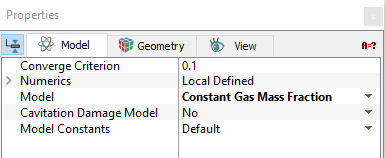
Figure 5.69 - Properties
|
| |
Note: When a template is used, Extended Mode has to be selected for Setup Options to view all the parameters.
|
The settings for the fluid domain under the Cavitation module are classified under the following categories: