5.6.4 Output Variables
This section explains the outputs that are obtained from the Heat module. They are categorized as follows:
- Primary Variables
- Property Variables
- Derived Variables
- Integrated Quantities
- Temperature Distribution
- Flux Distribution
- Heat Coefficient Distribution
- Heat Transfer Coefficient Distribution with Specified Reference Temperature
- Time Averaged Heat Transfer Coefficient Distribution
- Time Averaged Heat Transfer Coefficient Distribution with Specified Reference Temperature
|
Note: In order to display the contours and X-Y plots, or to write the outputs into an ascii file, the outputs on each Geometric entity (such as Boundary, Volume, Interface or Points) need to be activated in the Model Tab of the Properties Panel. |
Primary Variables
Primary Variables are the fundamental variables that characterize the physical process in the module. They are usually obtained by directly solving transport equations or through physical constitutions. The primary variables can be displayed in the GUI Viewing Window for selected Geometric Entities as well as written to the ascii file Filename_points.txt. They can also be viewed as X-Y Plots for Point Probes.
For the Heat module, a list of Primary Variables is shown in the table below:
| Heat Module Primary Variables | |||||
|---|---|---|---|---|---|
| Label in GUI | Label in GUI X-Y Plot Menu | Label in point.txt | Definition | Units | Display/Output Options |
| Temperature | Temperature | T_ | Temperature | K | At a Point and In the GUI Display Window |
Table 5.29 - Heat module primary variables
Primary Variables are automatically activated for selected Geometric Entities, including Boundaries, Derived Surfaces, Interfaces, Streamline, Particles and/or Volumes, depending on the modules selected.
Property Variables
Property Variables are the physical properties for the fluid(s) and solid(s) in the domain. They are required as a part of the solution. They may be displayed in the GUI Viewing Window for selected Geometric Entities as well as written to the ascii file Filename_points.txt (when activated). They can also be viewed as X-Y Plots for Point Probes.
For the Heat module, a list of Property Variables is shown in the table below:
| Heat Module Physical Properties | |||||
|---|---|---|---|---|---|
| Label in GUI Variables List | Label in GUI X-Y Plot Menu | Label in points.txt | Definition | Units | Display/ Output Options |
| Conductivity | Conductivity | NA | Effective Conductivity | W/m-K | At a Point and In the GUI Display Window |
Table 5.30 - Heat module property variables
As shown in Figure 5.151, Property Variables are automatically activated for output on selected Geometric Entities, including Boundaries, Derived Surfaces, Interfaces, Streamline, Particles and/or Volumes, depending on the modules selected. For Point Probes, however, explicit activation is required.
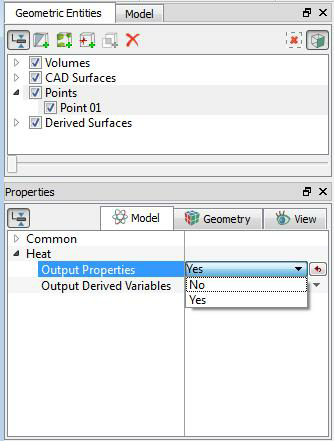
Figure 5.151 - Output activation for Points-Property Variables
Derived Variables
Derived Variables are engineering data computed from the Primary Variables. While not required as a part of the solution, they provide valuable information for analysis of the results. They can be displayed in the GUI Viewing Window for selected Geometric Entities as well as written to the ascii file Filename_points.txt (when activated). They can also be viewed as X-Y Plots for Point Probes.
A list of the Derived Variables for the Heat module is shown below:
| Heat Module Derived Variables | |||||
|---|---|---|---|---|---|
| Label in GUI Derived Variables List | Label in GUI X-Y Plot Menu | Label in point.txt | Definition | Units | Display/Output Options |
| Capacity | Capacity | NA | Effective specific heat | J/kg-K | At a Point and In the GUI Display Window |
| Enthalpy | Enthalpy | E_ | Enthalpy | J/kg | At a Point and in the GUI Display Window |
| Total Enthalpy | Total Enthalpy | Et_ | Total enthalpy | J/kg | At a Point and in the GUI Display Window |
| Total Energy | Total Energy | Ht_ | Total internal energy | J/kg | At a Point and in the GUI Display Window |
| Total Temperature | Total Temperature | Tt_ | Total temperature | K | At a Point and in the GUI Display Window |
Table 5.31 - Heat module derived variables
As shown in Figure 5.152, Derived Variables are automatically activated for output on selected Geometric Entities, including Boundaries, Derived Surfaces, Interfaces and/or Volumes, depending on the modules selected. For Point Probes, however, explicit activation is required.
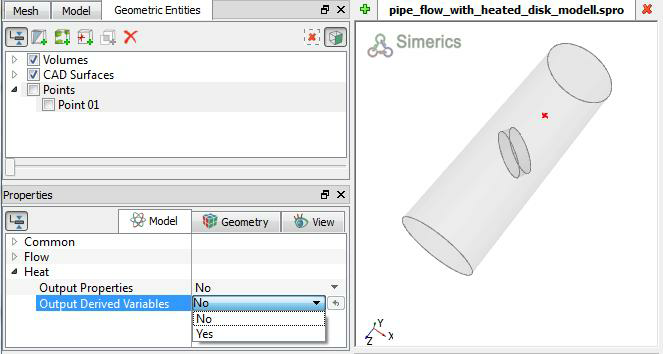
Figure 5.152 - Output activation for points-Derived variables
Integrated Quantities
An Integrated Output is the averaged or total value of a variable over a Boundary, Interface or Volume. When available and activated, the integrated quantities can be stored in the ascii file Filename_integrals.txt as well as be displayed in the GUI using X-Y Plots.
To access the variables listed below using expressions, the syntax given under Expressions column in Table 5.32 is used with a suffix “@boundary or volume name” such as temp_outlet = heat.T@outlet.
A table of the Integrated Quantities for the Heat module is shown below:
| Heat Module Integrated Quantities | ||||||
|---|---|---|---|---|---|---|
| Label in GUI Properties | Label in GUI Plot Menu | Label in integral.txt | Units | Definition | Application | Expression |
| Temperature (T) | Temperature | T | K | Area/volume weighted average temperature | Volumes, Boundaries & Interfaces | heat.T |
| Min/Max Temperature |
Min Temperature Max Temperature |
max_t_ | K | Min/Max temperature | Volumes, Boundaries & Interfaces | heat.max_t |
| min_t_ | heat.min_t | |||||
| Total Temperature | Total Temperature | Tt_ | K | Area weighted average total temperature | Boundaries & Interfaces | heat.Tt |
| Mass Avg. T | Mass Avg. Temperature | T_m_ | K | Mass weighted average temperature | Volumes | heat.T_m |
| Flux Per Area | Flux | q_ | W/m2 | Area weightedaverage heat flux | Boundaries & Interfaces | heat.q |
| Total Flux | Total Flux | Q_ | W | Area weighted average heat flux | Boundaries & Interfaces | heat.Q |
| Avg. Enthalpy | Enthalpy | h_ | J/kg | Volume weighted average enthalpy | Volumes | heat.h |
| Mass Avg. Enthalpy | Mass Avg. Enthalpy | h_m_ | J/kg | Mass weighted average total enthalpy | Volumes | heat.h_m |
| Enthalpy | Integrated Enthalpy | H_ | J | Volume weighted average internal energy | Volumes | heat.H |
| Avg. Total Enthalpy | Total Enthalpy | ht_ | J/kg | Volume weighted average total enthalpy | Volumes | heat.ht |
| Total Enthalpy | Mass Avg. Tot. Enthalpy | ht_m_ | J/kg | Area or Volume weighted average total internal energy | Volumes, Boundaries & Interfaces | heat.ht_m |
| Mass Avg. Enthalpy | Mass Avg. Enthalpy | h_m_ | J/kg | Mass weighted average total enthalpy | Volumes | heat.h_m |
| Total Enthalpy | Integrated Tot. Enthalpy | Ht_ | J | Volume weighted average total enthalpy | Volumes | heat.Ht |
| Avg. Internal Energy | Energy | e_ | J/kg | Volume Weighted Average enthalpy | Volumes | heat.e |
| Mass Avg. Int. Energy | Mass Avg. Energy | e_m_ | J/kg | Mass weighted average enthalpy | Volumes | heat.e_m |
| Internal Energy |
Integrated Energy |
E_ | J | Sum of the energy | Volumes | heat.E |
| Avg. Tot. Int. Energy | Total Energy | et_ | J/kg | Average total energy | Volumes | heat.et |
| Mass Avg. Tot. Int. Energy | Mass Avg. Tot. Energy | et_m_ | J/kg | Mass weighted average total energy | Volumes | heat.et_m |
| Tot. Internal Energy | Integrated Tot. Energy | Et_ | J | Sum of the total internal energy | Volumes | heat.Et |
For a selected Geometric entity, the integrated outputs must be explicitly activated as shown in Figure 5.153.
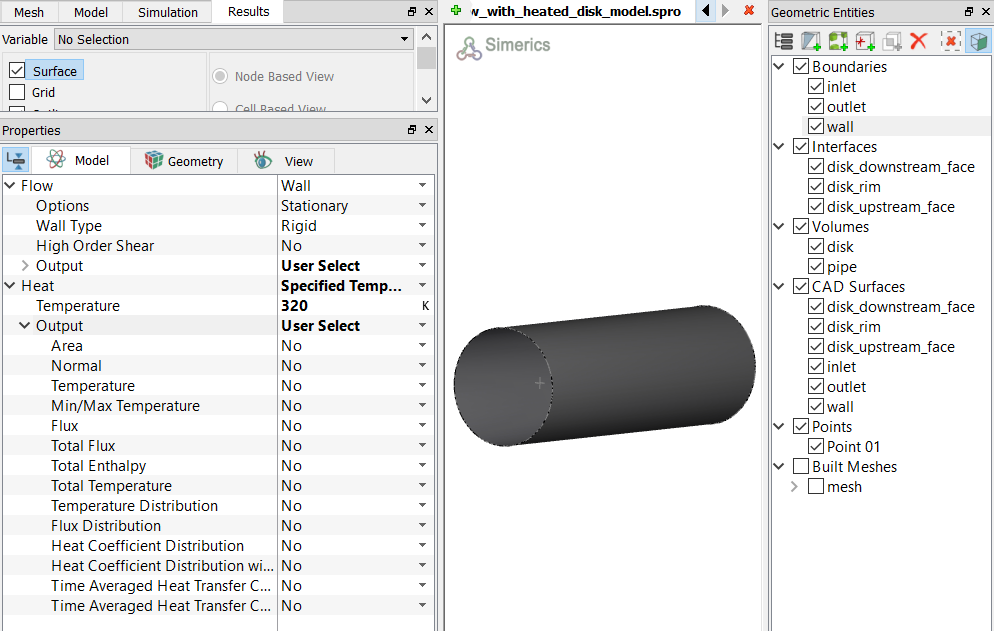
Figure 5.153 - Output activation-Integrated quantities
For boundaries, the variables Heat Flux (W/m2) and Time Averaged Heat Transfer Coefficient (W/m2-K) are available for output in the GUI Display Window under Boundary Variables.
Temperature Distribution
The Temperature Distribution output is activated for a selected boundary under the Heat module as follows:
- Geometric Entities Panel > Boundaries > [Desired Boundary]
- Properties Panel > Model Tab > Heat > Output > User Select > Temperature Distribution > Yes
There are two file formats for the temperature distribution:
-
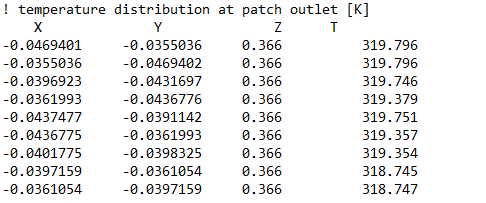
When File Format is selected as Point, the temperature and coordinates of the boundary are stored in the file: Filename_boundary_temperature.txt, as shown in Figure 5.155. They are written at the same frequency as the result files are saved.
-
When File Format is selected as Creo Simulate, we specify Mesh Scale, Reference Value and Scale. The output is stored in a .fnf file format for Creo Simulate.
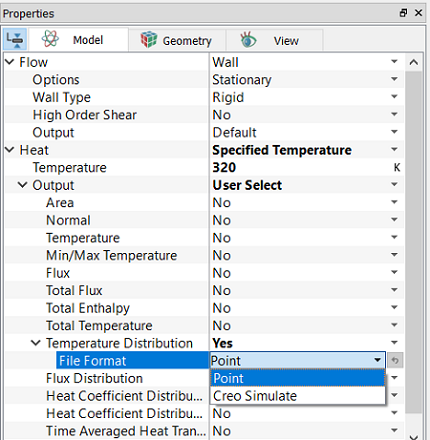
Figure 5.154 - Temperature distribution formats |
|
|
Note:
|
Flux Distribution
The Flux Distribution output is activated for a selected boundary under the Heat module as follows:
- Geometric Entities Panel > Boundaries > [Desired Boundary]
- Properties Panel > Model Tab > Heat > Output > User Select > Flux Distribution > Yes
The flux and coordinates of the boundary are stored in the file: Filename_boundary_q_bc.txt
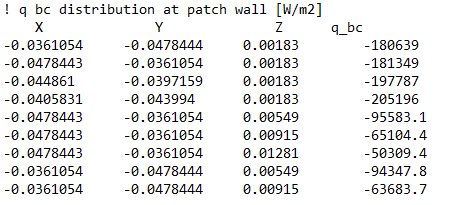
Figure 5.156 - Flux distribution file
|
Note:
|
Heat Transfer Coefficient Distribution
The Heat Transfer Coefficient Distribution output is activated for a selected boundary under the Heat module as follows:
- Geometric Entities Panel > Boundaries > [Desired Boundary]
- Properties Panel > Model Tab > Heat > Output > User Select > Heat Coefficient Distribution > Yes
The heat coefficient and coordinates of the boundary are stored in the file: Filename_boundary_h_bc.txt
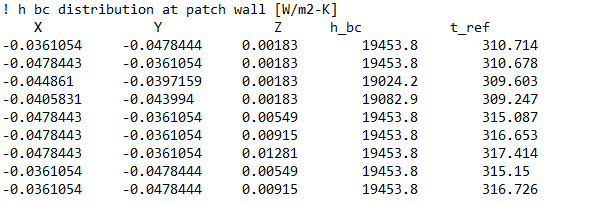
Figure 5.157 - Heat coefficient distribution file
|
Note:
|
Heat Transfer Coefficient Distribution with Specified Reference Temperature
The Heat Transfer Coefficient Distribution with Specified Reference Temperature output is activated for a selected boundary under the Heat module as follows:
- Geometric Entities Panel > Boundaries > [Desired Boundary]
- Properties Panel > Model Tab > Heat > Output > User Select > Heat Transfer Coefficient Distribution with Specified Reference Temperature > Yes
This requires specifying a Reference Temperature. The heat transfer coefficient distribution on the boundary is stored in the file: Filename_boundary_ hbc_t_ref.txt. They are written at the same frequency as the result files are saved.
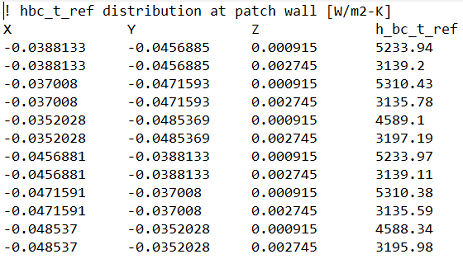
Figure 5.158 - Heat Transfer Coefficient distribution with Specified Reference Temperature Output file
|
Note:
|
Time Averaged Heat Transfer Coefficient Distribution
The Time Averaged Heat Transfer Coefficient Distribution outputs are spatial distributions of "Time Average" values of heat transfer coefficient, heat flux and reference temperature on boundaries:
"Time Average" is the average values during a "Period" of time. The "Period" is defined as number of time steps of a transient simulation. This “Period” is specified by the Cycle Computation Interval. The Time Averaged Heat Transfer Coefficient Distribution output is activated for a selected boundary as follows:
- Click Common in the Model Panel.
- In Properties Panel > Model Tab, set Cycle Computation Interval, which is the number of time steps for the "Period" user wants to calculate time average, or find minimum and maximum values.
- Geometric Entities Panel > Boundaries > [Desired Boundary]
- Properties Panel > Model Tab > Heat > Output > User Select > Time Averaged Heat Transfer Coefficient Distribution > Yes
The time averaged values of heat transfer coefficient, heat flux and reference temperature on the boundary are stored in the files: Filename_boundary_Average_h_coeff.txt, Filename_boundary_Average_heat_flux.txt and Filename_boundary _Average_reference_temp.txt respectively. They are written at the same frequency as the result files are saved.
.
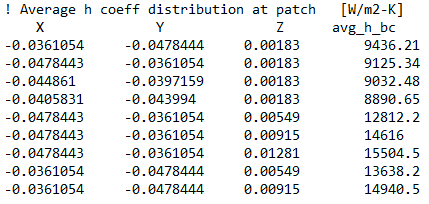
Figure 5.159 - Time Averaged Heat Transfer Coefficient distribution output file
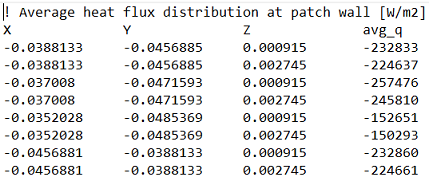
Figure 5.160 - Time Averaged Heat Flux distribution output file
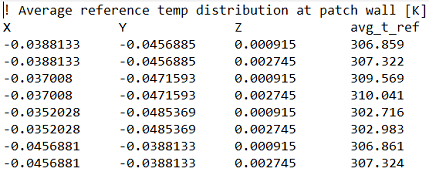
Figure 5.161 - Time Averaged Reference Temperature distribution output file
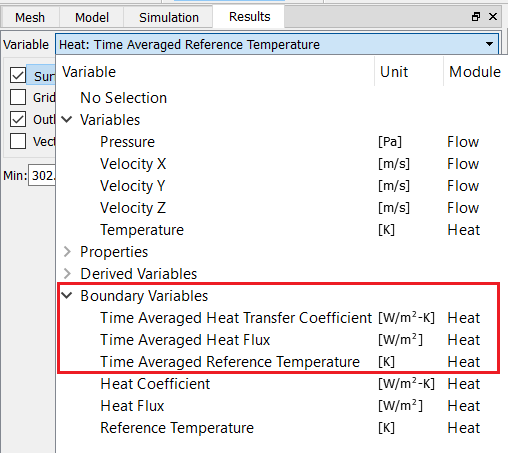
The added outputs are shown in the Results Panel under Variable > Boundary Variables as shown in Figure 5.163. They are plotted as contours on the selected boundary..
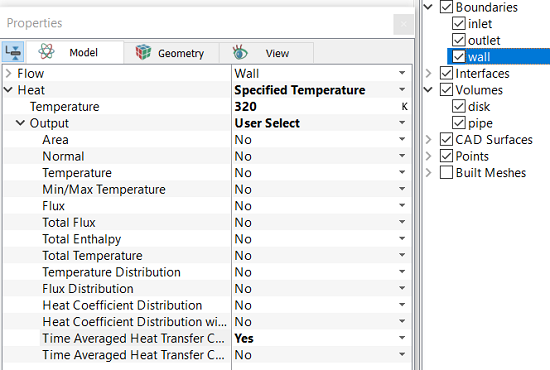
Figure 5.162 - Time Averaged Reference Temperature Distribution BC |
|
|
Note:
|
Time Averaged Heat Transfer Coefficient Distribution with Specified Reference Temperature
The Time Averaged Heat Transfer Coefficient Distribution with Specified Reference Temperature output is activated for a selected boundary under the Heat module as follows:
- Geometric Entities Panel > Boundaries > [Desired Boundary]
- Properties Panel > Model Tab > Heat > Output > User Select > Time Averaged Heat Transfer Coefficient Distribution with Specified Reference Temperature > Yes
The heat transfer distribution is stored in the file: Filename_boundary_ Average_h_coeff_specified_reference_temp.txt. Time Averaged Heat flux is also written as Filename_boundary_Average_heat_flux.txt in case the Time Averaged Heat Transfer Coefficient Distribution output is not activated. They are written at the same frequency as the result files are saved.
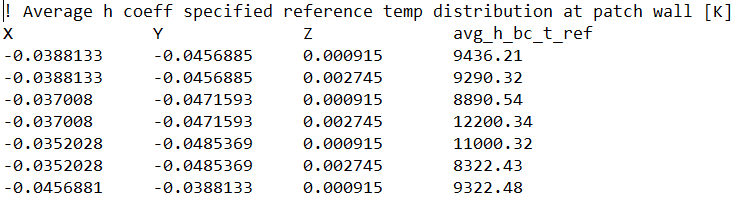
Figure 5.164 - Time Averaged Heat Transfer Coefficient with Specified Reference Temperature distribution Output file
|
Note:
|