隐藏
消隐功能允许您基于变量值,排除区域中特定部分(即选择性显示某些单元格或数据点)的绘制。在三维场景中,其效果类似于剖视图。
消隐设置仅适用于当前活动帧,但可通过帧链接同步多个帧的值消隐设置。关于链接的更多信息,请参阅Frame Linking。体区域的消隐结果取决于对话框的"曲面"页面中"要绘制的曲面"设置(详见Surfaces)。
以下讨论中使用了"单元格"一词。在I有序数据集中,单元格指两个相邻点之间的连接;在IJ有序数据集中,单元格指四个相邻数据点围成的四边形区域;在IJK有序数据集中,单元格指八个相邻数据点围成的六面体(六面体)体积。对于有限元数据集,单元格等同于单元。
消隐形式如下:
- Value Blanking
-
基于每个单元格数据点或单元格与约束边界交点处的值消隐变量,排除所选区域或线图映射中的单元格(或单元格部分)。
- IJK Blanking
-
基于索引值包含或排除单个IJK有序区域的单元格(仅限IJK有序区域)。
所有消隐类型可在同一绘图中使用,且具有累积效应:被任一选项消隐的单元格均不显示。值消隐和深度消隐影响所有类型的选定区域,而IJK消隐仅影响单个IJK有序区域。
通常,所有消隐类型会影响所有场图层、区域及其他绘图属性(边缘层除外),但存在以下例外:
| 消隐类型 | 未消隐的属性 |
|---|---|
值消隐 |
边缘层 |
IJK消隐 |
1. Derived Objects can opt in or out of blanking. (See Blanking Settings for Derived Objects.)
|
值消隐
值消隐允许您选择性消除或修剪线图和三维场图中的单元格(仅限)及单元。对于每个活动约束,您需指定一个值消隐变量、一个常量值或另一个变量,以及一个条件语句,告知Tecplot 360根据指定变量或常量消隐该区域。
场图的值消隐
要在绘图中包含值消隐,请前往Menuand select. This
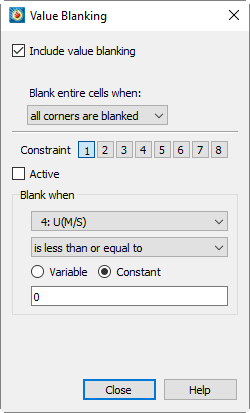
- dialog contains the following options:
-
Include Value Blanking
Toggle on to include value blanking.
- Note that settings in the Value Blanking dialog can be edited without actually activating blanking. This speeds up blanking setup because the plot does not need to be redrawn after each setting change.
-
Blank Entire Cell When
- Select one of the following blanking styles:
-
All Corners Blanked
- Removes a cell from the plot if all its data points satisfy one or more active blanking constraints.
-
Any Corner Blanked
- Removes a cell from the plot if any of its data points satisfy one or more active blanking constraints.
-
Primary Value Blanked
Removes a cell from the plot based on its primary value. The primary value of a cell depends on the zone type and variable value location, as shown in the table below. Zone Type Value Location Primary Value Source
Ordered
Cell Center
Cell value
Cell Centered
Cell value
Ordered
Finite Element
Node
Finite element
Nodal
First node in the element connectivity list
Please refer toZone/Variable Info Page的dialog to determine the zone type and value location.
- Constraint
-
Up to eight value blanking constraints can be set. Click the numbered button here to select the constraint to add or modify.
- Active
-
Toggle on to activate the selected constraint.
- Blanking condition
-
For each constraint, set the following parameters:
-
Select the variable for value blanking.
Typically, you candialog (viaaccess) to create a new variable. SeeEquation Syntax. -
Specify an operation describing how the blanking variable is compared to the subsequent constant or variable.
-
Choose to compare the blanking variable with another variable or a constant. If comparing with a variable, select that variable; if comparing with a constant, enter that constant.
-
- Show constraint boundary
-
Toggle on to display a line that
- Color
-
Select the color of the boundary in the color picker.
- Line type
-
Select the line type for the boundary.
- Pattern length
-
选择图案长度,以帧高度的百分比表示。
- 线宽
-
将边界线宽度选择为帧高度的百分比。
值消隐对有序区域的边线没有影响。如果边线处于开启状态,则会绘制整个区域(未应用值消隐)的边线。
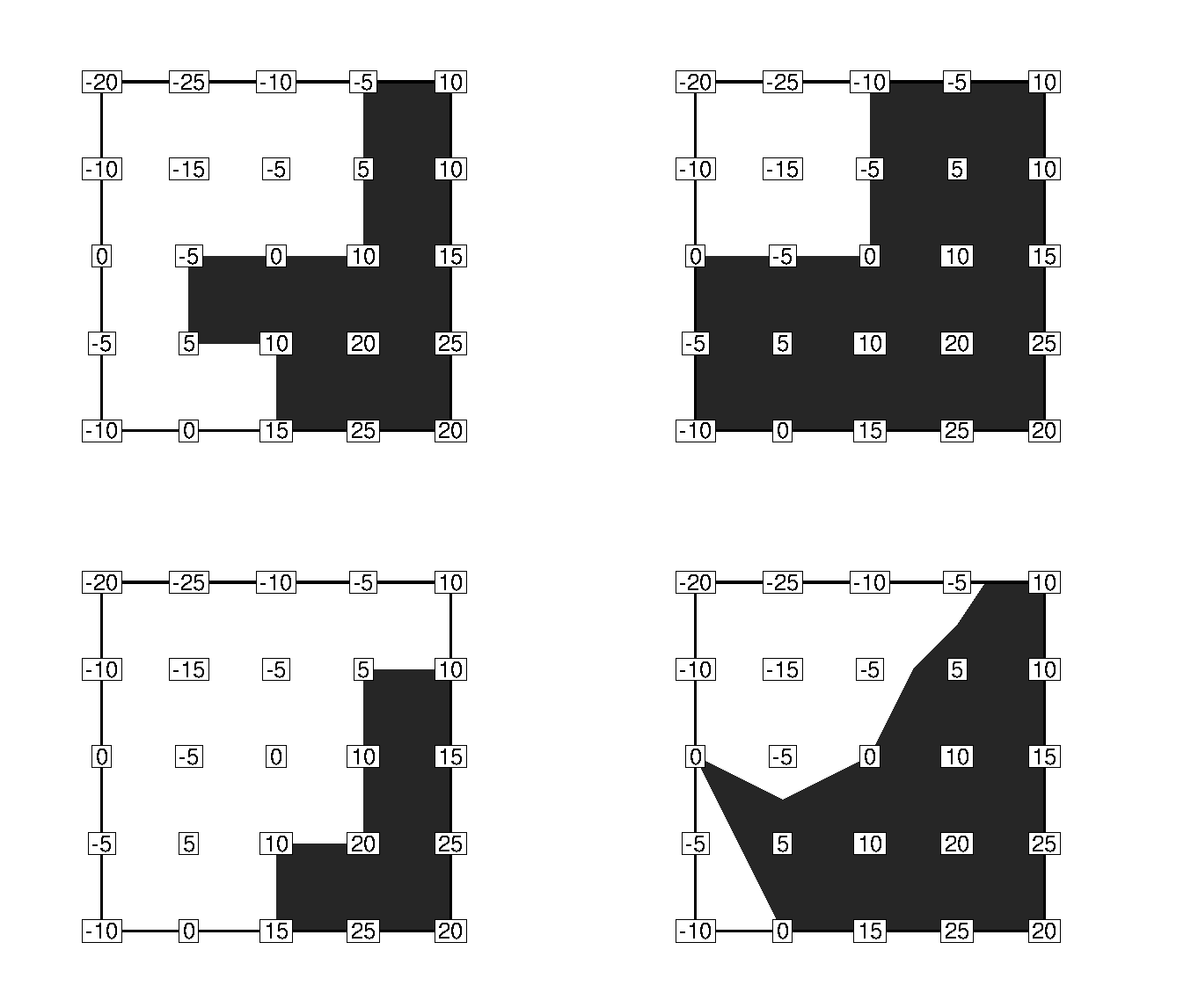
下图说明了绘图中各种值消隐模式。
线图的值消隐
对于线图,值消隐会将数据点从最终绘图中排除。其设置与Value Blanking for Field Plots相同,只是您无法选择相对于单元的消隐行为,因为这不适用于线图。
作为值消隐的替代或补充方法,您可以使用对话框的 Indices 页面来限制每个映射的索引范围。Curves 页面通过允许您限制单个映射的自变量范围,提供了另一种消隐形式。
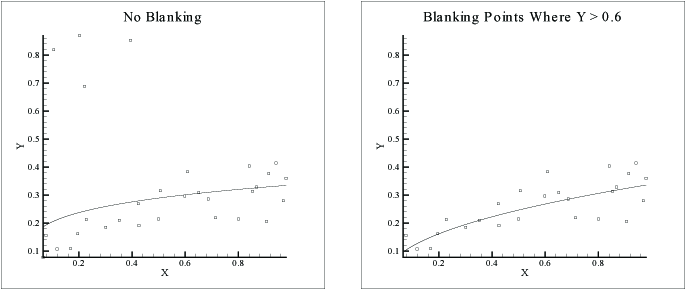
Figure 2显示了两幅图。这些图的原始数据包含一些"坏"数据点。坏数据点被识别为 Y 值大于 0.6 的点。左侧的图使用了所有数据点(包括坏数据点)来绘制曲线。右侧的图通过使用值消隐过滤掉了坏数据点,其中如果 Y → 0.6,则移除所有点。消隐不一定必须针对因变量或自变量。
IJK 空白处理
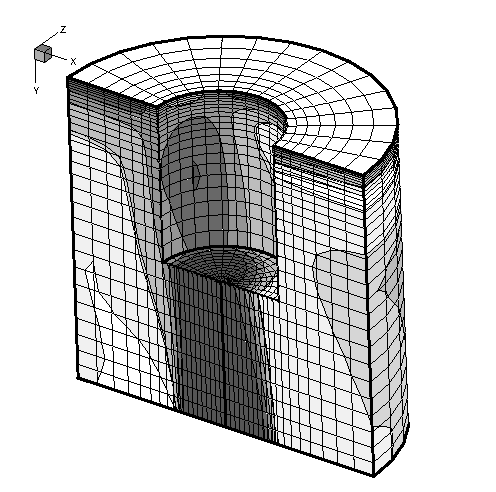
IJK 空白处理适用于 2D 和 3D 有序区域,在 2D 和 3D 笛卡尔绘图类型中可用。IJK 空白处理会从绘图中移除一个 IJK 有序区域的选定部分。这允许您创建剖切图:显示某些数据集外部并"切掉"一部分以显示内部的图,例如Figure 3.
| 中所示的图。要使用 IJK 空白处理,您必须有一个 2D 或 3D IJK 有序区域,并且当前绘图类型必须是 2D 或 3D 笛卡尔。与Value Blanking不同,后者作用于单个帧内的所有区域,而 IJK 空白处理只能用于帧内的单个区域。 |
要使用 IJK 空白处理,请从菜单中选择。仅当您的数据集至少有一个 IJK 有序区域时,此选项才可用。
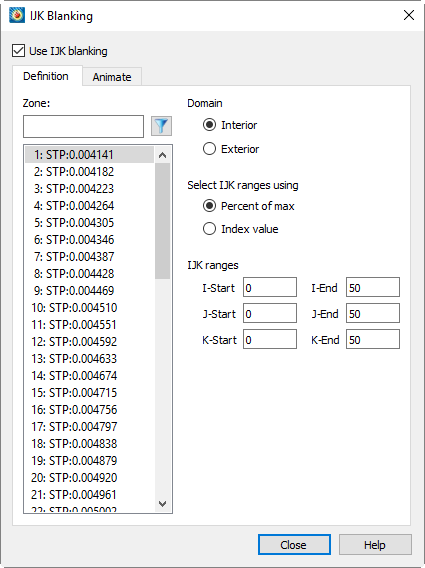
此对话框顶部的复选框用于开启或关闭 IJK 空白处理。Definition 页面包含以下选项。
- 使用 IJK 空白处理
-
Toggle on to include IJK blanking in the plot.
- Zone
-
Select the zone to apply IJK blanking by clicking on the displayed list of IJK ordered zones. You can only select one zone.
If the dataset contains multiple zones, filtering the zone list can be useful. Enter part of the zone name and press Enter (or click the filter button next to the zone name field) to display only zones whose names contain the entered text.
- 域
-
Specify the domain for IJK blanking by selecting one of the following options:
- Interior
-
Specifies that cells within the index range are hidden, while cells outside the range are plotted. This creates a "hole" in the zone. [T0006] The left side shows an ordered zone with IJK Blanking using the Interior domain.Figure 4shows an ordered zone with IJK Blanking with Interior domain.
- Exterior
-
Specifies that cells outside the index range are hidden, while cells within the range are plotted. The Exterior domain plots a sub-region of the zone. [T0009] The right side shows an ordered zone with IJK Blanking using the Exterior domain.Figure 4shows an ordered zone with IJK Blanking with Exterior domain.
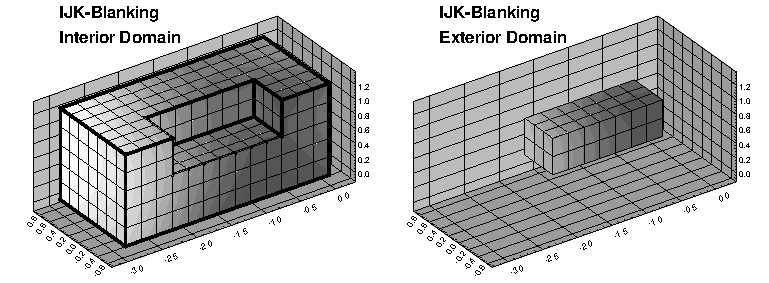 Figure 4. IJK Blanking with Interior domain (left) and Exterior domain (right).
 - Select IJK range using:
-
Specify the input format for the index range by selecting one of the following option buttons:
- Index Value
-
Specify the I, J, and K index ranges using absolute index values.
- Percentage of Maximum
-
Specify the I, J, and K index ranges as starting and ending percentages of the maximum index. For example, set the start percentage to 33.3 and the end percentage to 66.6 to hide the middle third of the dataset.
When saving a layout, macro, or style sheet, the index range for IJK blanking is stored as a percentage of the maximum index, regardless of how you entered it. This allows a layout to be easily used with datasets containing zones of different sizes.
For information on using animation pages, seeIJK Blanking Animation.
Derived Object Blanking Settings
You can choose to enable or disable blanking for derived objects (isosurfaces, streamlines, or slices) in their respective [T0020] dialogs. dialogs.
- Isosurface
-
This option is located in the Style page of the [T0023] dialog (click the [T0024] button to the right of the isosurface in the plot sidebar). See dialog (click the
 button to the right of Iso-Surfaces in the Plot sidebar). Refer to
Iso-Surface Contour and Shade详情请参阅。
button to the right of Iso-Surfaces in the Plot sidebar). Refer to
Iso-Surface Contour and Shade详情请参阅。 - Streamtraces(流线)
-
该选项位于 Integration(积分)页面上的 dialog (click the
 按钮(位于 Plot(绘图)侧边栏中 Iso-Surfaces 右侧)。请参阅Integration Page以获取详细信息。
 - Slices(切片)
-
该选项位于 Definition(定义)页面上的对话框中。请参阅Definition Page for details.