3.4 Mesh Panel
The Mesh Panel controls the operations related to the geometry and mesh.
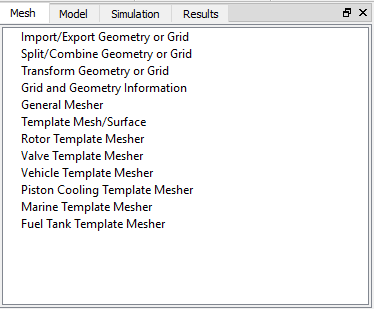
Figure 3.25 - Mesh panel
Import/Export Geometry or Grid
This is used to import CAD Surfaces and Grids. For more information, see Import/Export Geometry or Grid.
Split/Combine Geometry or Grid
This is used to split CAD Surfaces, Boundaries, Interfaces and Volumes. For more information, see Split/Combine Geometry or Grid.
Transform Geometry or Grid
This is used to modify the geometry of CAD Surfaces and Volumes. For more information, see Transform Geometry or Grid.
Grid and Geometry Information
This provides quantitative information on the Mesh and Surface entities in the model. For more information, see Grid and Geometry Information.
General Mesher
This is used to generate a volume mesh for any arbitrary geometry using the Binary-Tree Mesher. For more information, see General Mesher.
Template Mesh/Surface
This is used to generate Volume Meshes and Surfaces for a variety of basic geometrical shapes. For more information, see Template Mesh/Surface.
Rotor Template Mesher
This used to create a rotor mesh for pumps such as Bent Axis Piston, Crescent, External Gear, Gerotor, Progressive, Radial Piston, Rolling Piston, Swash Plate Piston, Vane, Scroll Compressor, Helical Gear and Planetary Gear. The Rotor Template Mesher is a feature available only in Simerics-MP+.
Valve Template Mesher
This is used to create a mesh for valves such as Spool Valve, Ball Valve, Axial Valve, Circumferential Valve. The Valve Template Mesher is a feature available only in Simerics-MP+.
Vehicle Template Mesher
This is used to create a mesh for Vehicle simulation such as front-end airflow, Underhood thermal etc. The Vehicle Template Mesher is a feature available only in Simerics-MP+.
Piston Cooling Template Mesher
This is used to create a mesh for piston cooling simulation including component such as piston surfaces, cylinder, con-rod, gallery and the nozzle. The Piston Cooling Template Mesher is a feature available only in Simerics-MP+.
Marine Template Mesher
This is used to create a mesh for Marine simulation such as Planing Hull and Displacement Hull. The Marine Template Mesher is a feature available only in Simerics-MP+.
Fuel Tank Template Mesher
This is used to create a mesh for the fuel tank simulation including component such as fuel line, nozzle and tank. The Fuel Tank Template Mesher is a feature available only in Simerics-MP+.